

A consumer in another EU country buys your subscription, the card clears, and the payout looks like any other. Any VAT due on that sale remains your responsibility when the processor takes the payment without becoming the legal seller.
VAT compliance software can take work off your desk without taking the tax responsibility off your business. Choose the wrong kind and you can still be managing registrations and tax obligations in countries you have never visited, even if a service files the returns.
Compare ten options to find out what can take cross-border VAT work off your desk.
If you already want someone else to take the seller role, try Creem at 3.9% + 40¢ per successful transaction, compared with Paddle’s standard 5% + 50¢.
How to choose: a legal seller or a filing tool
A filing service can prepare and submit VAT returns, but your business remains responsible for the tax. A merchant of record becomes the legal seller on the sales it makes and handles transaction taxes on those sales.
On a sale through a merchant of record, the provider calculates the tax at checkout, issues the invoice, and collects, files and remits it. With a filing tool, the tool can calculate and submit, but the registrations and the liability stay with your business.
A merchant of record fits new sales you would rather not register for. A filing or calculation tool fits a business that already holds registrations or sells through channels no merchant of record covers.
Then check that each provider supports your billing model, such as subscriptions or usage-based pricing, and onboards sellers in the country where your business is based.
If you already hold VAT or state registrations, ask a tax adviser to handle the returns or close the registrations. Moving new sales to a merchant of record does not remove your responsibility for them.
1. Creem

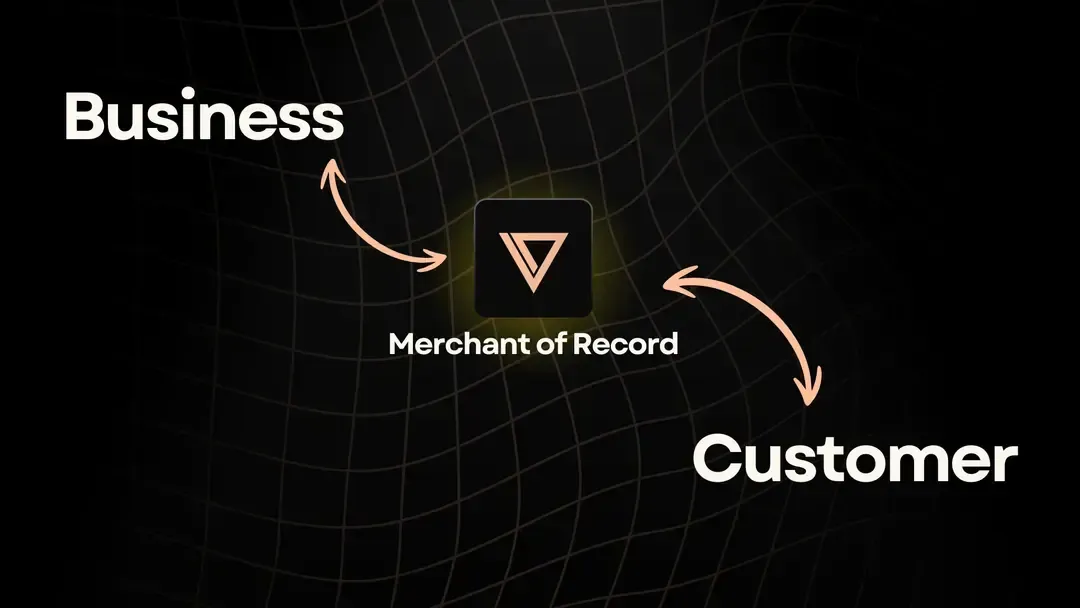
Creem is a merchant of record for software and digital products. As the legal seller on each covered sale, it calculates, collects, files and remits VAT, GST and sales tax for buyers worldwide and issues the invoice, so those sales need no tax registration of your own.
Creem stays the legal seller even when checkout runs on your own domain, so you need no registration of your own for those covered sales.
Pricing
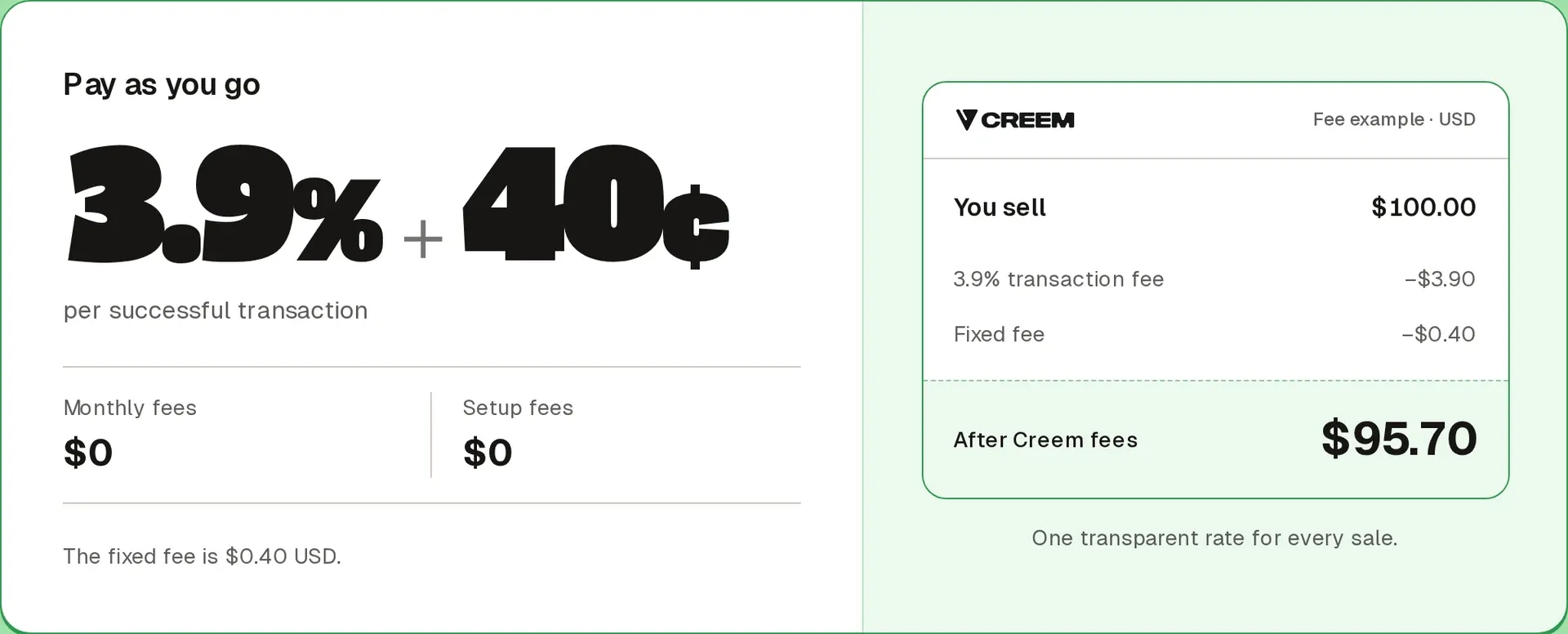
Creem charges 3.9% + 40¢ per successful transaction, or $4.30 on a $100 sale, with no monthly fee, setup fee or minimum volume.
Tax, invoicing, compliance and dispute handling are included in that rate.
Best for
Creem suits software and SaaS teams selling subscriptions, usage or one-time products across borders that want someone else to handle transaction tax on those sales.
Pros and cons
Pros
- Creem is the legal seller on covered sales, so it files and remits the tax and handles chargeback disputes.
- Subscriptions, usage-based billing and prepaid credits run through the same checkout that collects the tax.
- Tax questions reach real people on Discord, email and chat.
Cons
- Tax coverage applies to sales Creem makes. Returns owed on past sales, other channels or registrations you already hold still need a filing service or adviser.
- Seller onboarding covers fewer countries than buyer payments, so check that Creem onboards sellers where your business is based.
- Creem is built for software and digital products, so a store that mainly ships physical goods falls outside its focus.
How it compares
Creem sits with Paddle and PayPro Global as a legal-seller option, and against Paddle it charges 3.9% + 40¢ instead of 5% + 50¢. Stripe Tax, Avalara and Anrok work differently: they help with obligations that stay with your business, which suits teams with existing registrations or sales made elsewhere.
For new international software sales, you can try Creem and put checkout, invoices and VAT under one legal seller.
2. Stripe Tax
Stripe Tax Basic calculates and collects tax on your sales, while Tax Complete adds eligible registration and filing services. Your business remains liable for its tax obligations. Stripe also offers Managed Payments as a separate option where Stripe acts as the merchant of record.

Pricing
On the German pricing page, Basic costs 0.5% per transaction for no-code integrations, so a $100 sale carries a $0.50 tax-service fee separate from payment-processing costs. Basic API pricing is €0.45 per transaction, including 10 calculation calls, then €0.04 per additional call.
Tax Complete requires an annual contract billed monthly. The German pricing page lists these allowances:
| Monthly price | Monthly transactions | Annual registrations | Monthly API calls | Annual filings |
|---|---|---|---|---|
| €80 | 200 | 2 | 2,000 | 4 |
| €400 | 1,000 | 4 | 10,000 | 12 |
| €930 | 2,500 | 6 | 25,000 | 20 |
| €1,400 | 5,000 | 10 | 50,000 | 32 |
One supported quarterly registration uses all four filings on the starting plan. Non-US registrations and usage beyond plan allowances can add fees.
Best for
Stripe Tax suits teams that want tax calculation or eligible registration and filing services but want to remain the legal seller.
Pros and cons
Pros
- Basic calculates and collects tax without requiring the team to calculate each sale manually.
- Direct Irish non-Union OSS filing can cover eligible non-EU businesses selling services to consumers across EU member states. OSS, or One Stop Shop, lets those businesses report eligible EU sales through one return.
Cons
- For supported direct Irish and Canadian returns, you review the data and pay the tax authority yourself.
- The Irish direct route excludes B2B services, local VAT returns, Union OSS and IOSS. Canadian direct filing covers simplified GST/HST for eligible non-resident businesses, excluding normal GST/HST registrations and separately administered provincial taxes.
- Register for me does not set up filing or remit tax.
How it compares
I’d use Stripe Tax to manage tax obligations that stay with your business, and look at Managed Payments separately if you want Stripe to be the legal seller. Check which of your returns need coverage before choosing.
3. Paddle
Paddle is a merchant of record for eligible software and digital content. It resells your product as the legal seller and files and remits transaction taxes, including VAT, on covered sales.
Pricing
Paddle’s standard fee is 5% + 50¢ per transaction. On a $100 sale, that is $5.50, leaving $94.50 after the transaction fee, while Creem’s fee is $4.30, leaving $95.70 after its transaction fee, a $1.20 difference before payout costs.

Creem, Paddle, Lemon Squeezy, Polar and Stripe Managed Payments calculate their transaction fees on the amount the buyer pays, including tax. Paddle uses custom pricing for products under $10.
International SWIFT payouts cost $15, €15 or £15, and recipient or intermediary banks may add charges. If the balance and payout currencies differ, Paddle’s terms allow a conversion margin of up to 1.5%.
Best for
Paddle suits software and digital-content teams that want a legal reseller to handle payments and tax on covered sales.
Pros and cons
Pros
- Like other merchants of record, Paddle handles payments and transaction-tax administration together on covered sales.
- Eligible business buyers can enter a valid VAT ID at checkout and account for VAT through their own return under reverse charge.
Cons
- International SWIFT payouts cost $15, €15 or £15, and recipient or intermediary banks may add charges.
- Paddle’s terms allow a conversion margin of up to 1.5% when the balance and payout currencies differ.
How it compares
I’d put Paddle alongside Lemon Squeezy as a legal-seller option. If you also sell elsewhere, plan separately for any returns those sales require.
4. FastSpring
FastSpring is a merchant of record for software and digital products. It acts as the legal seller on covered sales, collecting and remitting VAT and sales tax.

Pricing
FastSpring negotiates its commission based on transaction type and business volume. Two percentage options are approximately 8.9% or 5.9%. On a $100 sale, those commissions would leave $91.10 or $94.10 respectively, before separate charges.
If your store and payout currencies differ, currency conversion adds 2.5%. Exceptional manual refunds cost $10 by physical USD check or $30 by wire. FastSpring’s agreement also permits a Vendor Risk Verification Fee.
Best for
FastSpring suits software teams that want payments, subscriptions and transaction taxes handled in one commerce platform.
Pros and cons
Pros
- FastSpring responds to VAT and sales-tax audits related to its covered sales.
- There is no minimum transaction volume.
Cons
- FastSpring cannot be purchased as a payment processor alone.
- Activation requires a signed agreement, tax information and identity or registration documents. FastSpring reviews the store and completes KYC verification before live processing.
- FastSpring applies an initial 45-day monitoring hold. Standard settlement takes 14 days, and payouts normally run twice monthly with a default threshold equivalent to $100. Failed bank transfers wait for the next scheduled payout cycle.
How it compares
I’d consider FastSpring if you want to replace part of your commerce stack rather than add filing to an existing sales channel. Compare its negotiated commission and any currency-conversion charge with what your current setup costs.
5. EU VAT compliance by Chargebee
Chargebee applies the EU VAT rules you configure within subscription billing. Your business stays the legal seller, so registration, filing and remittance are still yours to arrange.
Pricing
Chargebee lists two Flow billing prices. One is $0 plus 0.80%, which comes to $0.80 on a $100 sale. The other is $99 per month plus 0.65%, or $0.65 on that sale alongside the monthly charge. These are billing prices, not standalone EU VAT compliance fees.
Chargebee lists no separate price for its EU VAT feature. Filing and reporting through its Avalara integration require a separately paid Avalara account.
Best for
Chargebee suits teams already using it for subscription billing that manage their own VAT registrations and want VAT rules applied to invoices.
Pros and cons
Pros
- Your team can apply VAT rules through billing instead of handling each subscription invoice manually.
- The Avalara connection can synchronize invoices and credit notes with the tax account.
Cons
- You must maintain your VAT registration information in Chargebee.
- When a card is added or updated, the billing country must match the IP or card-issuing country. A failure can cancel the subscription, requiring correction and reactivation.
How it compares
I’d put Chargebee alongside Recurly as a billing-based tax option. Paddle takes a different role by becoming the reseller for covered digital-product sales.
Chargebee can make invoicing easier when your team already handles its tax obligations. If that’s your setup, shortlist it alongside a filing service.
6. EU VAT by Recurly
Recurly brings EU VAT calculation into subscription billing, with Avalara powering the tax calculations. Your business still owns its registrations and must arrange filing outside the native feature.

Pricing
EU VAT is available on all Recurly plans. Starter costs $249 per month plus 0.9% of billing volume, with the first $40,000 of monthly billings included at no additional charge.
For a $100 sale, the marginal charge is zero within the included billing volume or 90¢ once you reach that volume, on top of the monthly platform fee.
At $50,000 in monthly billings, the percentage charge applies to $10,000, adding $90 to the platform fee for a total of $339 that month.
A merchant-owned Avalara AvaTax account requires a separate contract and cost.
Best for
Recurly fits established subscription businesses that want VAT calculated within their billing workflow and already have someone handling registrations and filing.
Pros and cons
Pros
- Qualifying invoices include a customizable reverse-charge note telling the business customer it accounts for the VAT.
- Invoice exports retain matching customer-location evidence for automatically collected invoices.
Cons
- Manual collection invoices require you to collect a second location-evidence item and record it before posting.
- Recurly stores results and timestamps from VIES, the EU VAT-number checking service, but not the consultation number. It revalidates at a billing event if the previous check is more than six months old.
- A VIES outage blocks new sign-ups that submit a VAT number. Renewals use the last stored validation result.
- With tax-location validation enabled, a failed renewal check expires the subscription with the reason “Tax Location Invalid.”
- Merchant-owned AvaTax tax previews require API preview endpoints and are unavailable through Recurly’s checkout or admin interface.
- The default “Unknown” tax type treats the product as tangible personal property, so check the classification for your software.
How it compares
I see Recurly as tax automation within billing, not a transfer of tax responsibility. Your business keeps its registrations and filing obligations, while a merchant of record becomes the legal seller for its covered sales.
Before relying on Recurly for EU sales, check who will maintain registrations and submit returns.
7. Avalara VAT Returns and Reporting
Avalara has two options for VAT returns filed in your business’s name. VAT Reporting is software your team runs with data from your accounting system, covering return preparation, validation and filing across 48 countries.
Managed VAT Reporting covers 53 countries and adds help with tax-office interaction and portal submissions. Check the service terms to see who pays the tax authority.
Pricing
Neither option has a product-specific price available.
Best for
Avalara suits teams that already have VAT registrations or need to file returns for sales outside a checkout platform. It brings return preparation and filing records into one workflow without replacing their accounting systems.
Pros and cons
Pros
- The UK workflow checks VAT figures against accounting and other tax records and links manual adjustments to their source data.
- The UK workflow uses VIES and European Central Bank data to validate and enrich VAT records.
- Avi assists with return preparation and review.
- UK filing records retain prepared and filed returns with their HMRC Submission IDs.
Cons
- The in-house software leaves your team responsible for operating the return workflow.
- Return preparation depends on data from your accounting system.
How it compares
I’d consider Avalara for return work beyond calculating tax on each sale. Its managed service helps with returns in your business’s name, while a service acting as the legal seller handles taxes on the sales it makes.
Choose the in-house software if someone on your team will run it, or look at Managed VAT Reporting if you need help with submissions.
8. Anrok
Anrok connects to your existing sales channels to calculate tax and handle registration, filing and remittance on your business’s behalf, with end-to-end international handling limited to select jurisdictions. Your business remains the seller.

Pricing
Anrok’s Starter plan starts at about $499 a month.
Best for
Anrok suits SaaS teams with finance or tax operations that want to outsource tax administration without replacing their billing and payment systems.
Pros and cons
Pros
- Starter includes global exposure monitoring, helping the team track where tax obligations may arise.
- In supported jurisdictions, Anrok can register the business after detecting an exposure threshold.
- US filing workflows let customers review and approve returns.
Cons
- Monitoring a jurisdiction does not mean Anrok handles its registration, filing and payments.
- The starting monthly cost matters for teams with lower sales volumes.
How it compares
If your team is keeping its existing sales channels, I’d check Anrok’s filing coverage against the jurisdictions where you owe returns. It handles those obligations on your behalf rather than becoming the legal seller.
9. PayPro Global
PayPro Global is the legal reseller for software and SaaS sales. As merchant of record, it takes responsibility for customer-related transaction taxes on sales covered by that arrangement.

Pricing
PayPro Global gives you a quote for its core transaction rate rather than publishing a standard rate, so you’ll need that quote to work out the fee on a $100 sale.
Payout charges are separate. A wire costs US$21, while a North American ACH payout costs US$3.
PayPal payouts in the US and Canada have no transfer fee, while international PayPal payouts cost 2%, capped at US$20.
Payoneer prepaid-card payouts cost US$2, and WebMoney payouts cost 3.5% + US$5.
Best for
PayPro Global suits software teams that want a merchant of record and help getting their commerce operation set up.
Pros and cons
Pros
- Initial integration help and personalized checkout assistance come at no additional charge.
- Subscription billing supports both manual and automatic renewals.
Cons
- The standard contract term is one year. There is no cancellation fee, though contract terms affect payouts on cancellation.
- Standard payouts run on the 15th for the previous month’s closing balance, less fees and adjustments.
How it compares
Against Paddle, I’d weigh PayPro Global’s assisted setup alongside its contract and payout terms. Both act as legal resellers, while Stripe Tax leaves your business as the legal seller. Review the written quote, tax scope and exit terms before committing.
10. Lemon Squeezy
Lemon Squeezy collects and remits VAT and sales tax on covered sales as a merchant of record. New sign-ups are closed, and the platform is scheduled to shut down on March 31, 2027.
Pricing
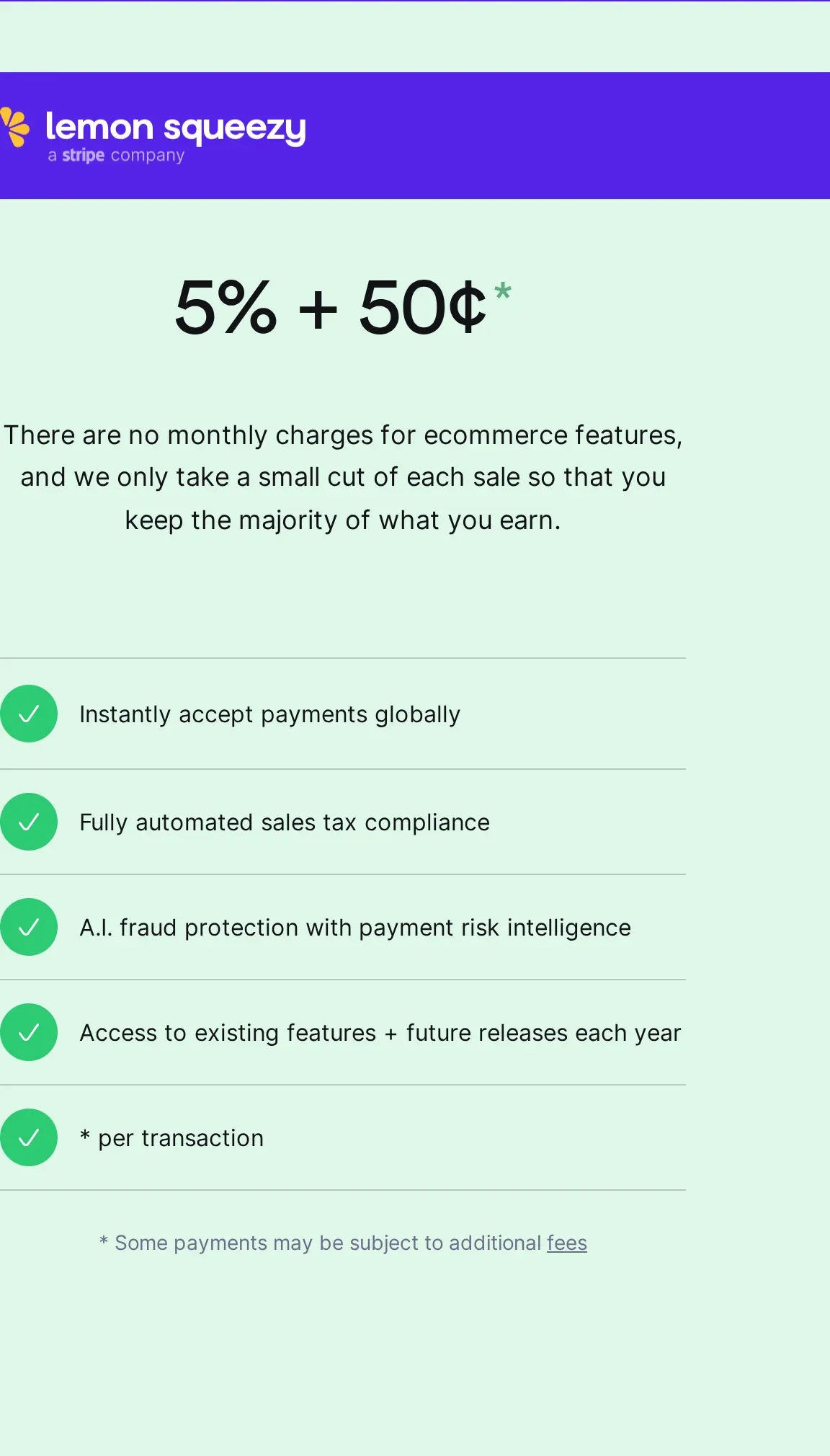
The base ecommerce fee is 5% + 50¢ per transaction, with no monthly ecommerce charge. On a $100 sale with no additional charges, you pay $5.50 and keep $94.50.
Lemon Squeezy adds 1.5% for transactions outside the US, 1.5% for PayPal transactions and 0.5% for subscriptions. On a $100 non-US subscription payment without PayPal, you pay $7.50 in transaction fees and keep $92.50.
That is $3.20 more than Creem’s standard transaction fee on the same sale, before payout costs.
Bank payouts outside the US cost 1%, while PayPal payouts outside the US cost 3%, capped at $30. Other fees include 5% on payments recovered through abandoned-cart recovery, 3% for merchant affiliate referrals and 2% for affiliate payouts.
Best for
Lemon Squeezy is relevant for existing merchants who need to review their tax records and choose where to move their sales.
Pros and cons
Pros
- A reverse invoice is created for each payout, so merchants do not need to invoice Lemon Squeezy separately.
- Changes to tax-inclusive pricing apply to future subscription invoices while leaving existing invoices unchanged.
Cons
- Tax-inclusive pricing cannot be set product by product.
- Transaction-tax handling does not cover the merchant’s income-tax obligations on payouts.
How it compares
I’d treat Lemon Squeezy as a transition decision for existing merchants. If you need a new platform, shortlist an available option that takes on the seller role or supports your own tax registrations and returns.
VAT compliance software options compared: who calculates, files and remits
Who is the legal seller determines whether a provider handles tax on its own sales or manages your business’s tax obligations. Outsourcing returns alone does not transfer your tax liability.
On a $100 sale, Stripe Tax Basic’s no-code tax-service fee is $0.50, Creem’s transaction fee is $4.30, and Paddle’s standard transaction fee is $5.50.
Basic costs $3.80 less than Creem and $5 less than Paddle, but payment processing is not included and your business remains responsible for filing. Creem and Paddle are the legal sellers on their covered sales.
| Option | Legal seller | Tax work and payment | Price |
|---|---|---|---|
| Creem | Creem | Calculates, collects, files and remits VAT, GST and sales tax on covered sales, and issues the invoice. | 3.9% + 40¢ per successful transaction, with no monthly fee. |
| Stripe Tax | Your business | Basic calculates and collects. Complete offers eligible filing. You pay authorities for supported direct Irish and Canadian returns. | German pricing: Basic no-code is 0.5% per transaction. Complete is from €80 monthly on an annual contract for 200 monthly transactions. |
| Paddle | Paddle | Calculates, files and remits on covered sales. | 5% + 50¢ per transaction. |
| FastSpring | FastSpring | Calculates, files and remits on covered sales. | Negotiated commission, with options around 5.9% or 8.9%. |
| Chargebee | Your business | Applies VAT to invoices. Filing needs a separate service. | One Flow billing option is $0 plus 0.80%. Standalone EU VAT pricing is not published, and Avalara requires a separate paid account. |
| Recurly | Your business | Calculates invoice tax. Filing requires an external arrangement. | Starter: $249 monthly plus 0.9%, with the first $40,000 of monthly billings included. |
| Avalara | Your business | VAT Reporting supports preparation and filing across 48 countries and is operated by your team. Managed VAT Reporting covers 53 countries and adds submission assistance. | Product-specific pricing not published. |
| Anrok | Your business | Calculates, files and remits on your behalf in supported jurisdictions. | Starter: about $499 monthly. |
| PayPro Global | PayPro Global | Takes customer-related tax liability on covered sales. | Transaction rate quoted. |
| Lemon Squeezy | Lemon Squeezy | Collects and remits tax on covered sales. Closed to new sign-ups. | 5% + 50¢, plus applicable surcharges. |
Stripe also offers Managed Payments as a separate merchant-of-record option. If you already hold registrations, shortlist a filing service for those obligations. If you want someone else to be the seller on new sales, compare the merchant-of-record options.
Creem: a legal seller for global software sales
For new software sales, consider a legal seller if your team wants someone else to handle transaction tax on those covered sales.
Calculation, billing and filing tools help you manage obligations that remain yours, so they suit teams with existing registrations or returns owed on past sales or sales made elsewhere.
Creem is the legal seller and billing platform for covered software sales. It calculates, collects, files and remits VAT, GST and sales tax for buyers worldwide and issues the invoice.
The standard rate is 3.9% + 40¢ per successful transaction, with no monthly or setup fee. Tax, invoicing, compliance and dispute handling are included.
For covered international software sales, try Creem to put payments, invoices and transaction taxes under one legal seller.