
Other products in your niche already sell on Whop, and launching there looks quick. Then you notice that Whop collects and remits tax only for buyers in the US, EU and UK, and your renewals come from everywhere.
Most guides to Whop are aimed at buyers and creators, so they won't untangle that. A software team needs answers on VAT, renewals and payouts once international subscription revenue runs through the platform.
The move is hard to undo. Whop's migration tool brings Stripe subscriptions in with their saved cards, but whether those cards can leave Whop later is a question to ask first, because asking every subscriber to authorise payment again puts renewals at risk.
You'll come away able to decide whether your software revenue should run through Whop or whether you should keep looking.
The short verdict on Whop
Whop is a legitimate platform that works, and it fits sellers whose product is creator or community access. If you sell a paid community or gated content to buyers mostly in the US, EU and UK, you're using it for the job it was built to do.
For a software team selling subscriptions worldwide, the verdict is narrower because Whop's collect-and-remit tax covers only the US, EU and UK.
Take a subscription with some renewals from Canada, Australia or India. With collect-and-remit switched on, Whop handles tax on the US, EU and UK renewals.
For the Canadian, Australian and Indian renewals, registering and filing falls to you wherever local rules or thresholds require it, so your tax duties change with the buyer's address.
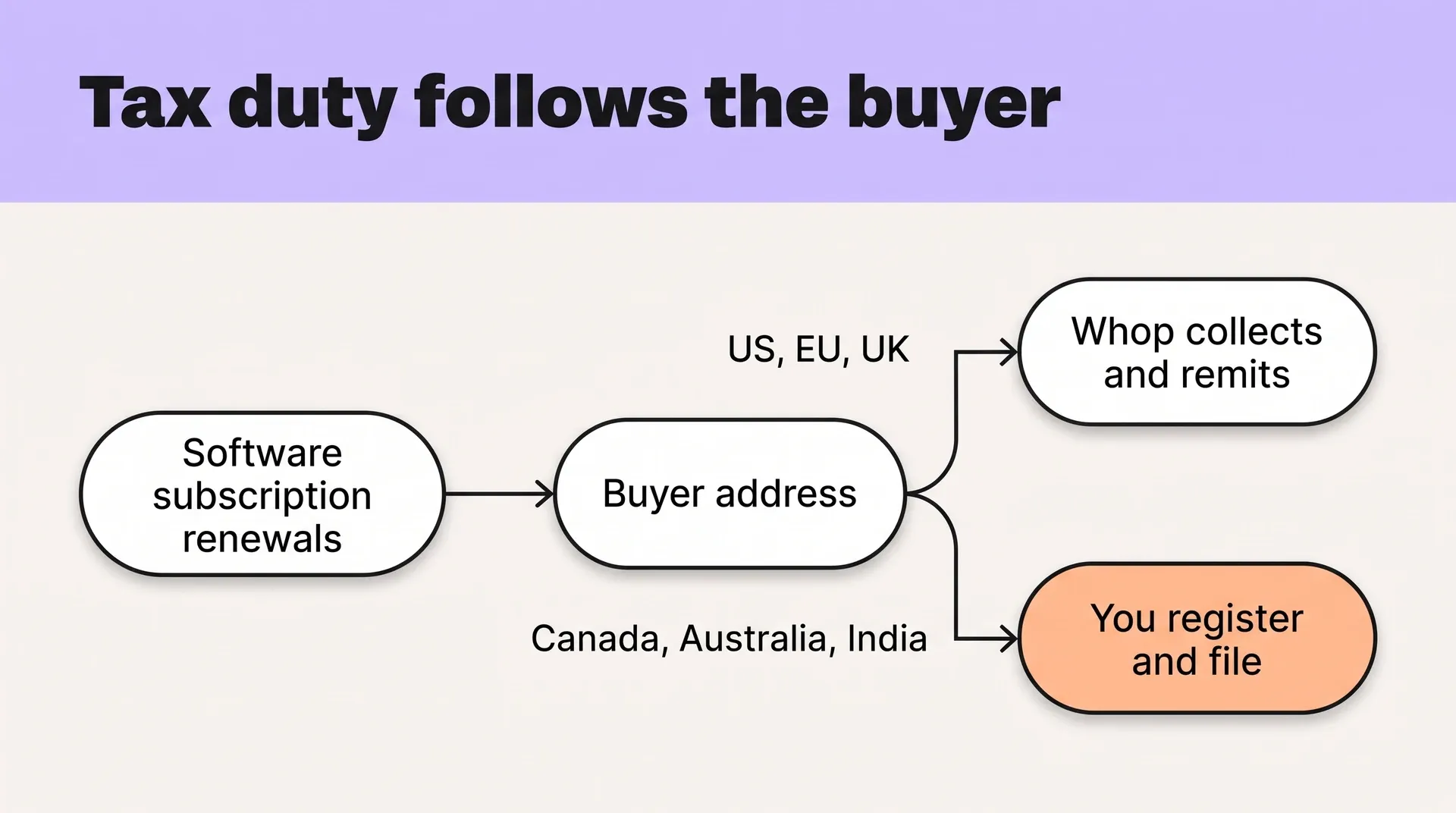
Flow diagram splitting a subscription's renewals by region: Whop remits US/EU/UK tax, you file for Canada, Australia, India
I'd tell a software seller to start looking elsewhere at one of two points:
- Buyers outside the US, EU and UK. Once your first ones arrive, part of your tax work sits outside what Whop collects and remits.
- Usage or credit pricing. That model needs meters, prepaid balances and refills, so confirm how Whop bills them before you change pricing.
If neither has happened yet, Whop can work for now, provided you know when payouts arrive and what holds apply first. If either is close, settle who files tax outside the US, EU and UK before the first renewal from those countries goes through Whop.
What this review is based on
This review rests on what Whop publishes about itself: its pricing page, tax guide, suspension policy, Stripe migration guide, prohibited-products list and help docs, as they stood in November 2026.
Those pages set the fees, tax coverage, payout holds and migration rules a seller agrees to. Where your account has its own terms, those apply instead, so check each figure in your dashboard before you move revenue.
What Whop is and how it works for sellers
On Whop, you build a website, list products or services, and take payments in the same place. The storefront, checkout and product sit together, which suits products where the buyer pays and gets access in one step.
Sellers list web apps, downloadable software, Discord communities and digital templates or files, and can bundle several into one purchase. If you sell an app, you can package it with a template pack and a seat in your Discord, so one payment unlocks all three.
What you sell on Whop, then, is access. A buyer pays, and that purchase unlocks the app, download or community seat attached to it.
A flat subscription or one-time license fits because each payment buys something defined. For plans priced per unit used, such as metered usage or prepaid credits, test how Whop bills them by building a metered or credit plan before you price that way.
Payment methods are the next thing to check. Whop lists cards, invoicing, ACH, wire transfer and buy now, pay later, but availability varies by account and buyer country.
That matters most when you sell annual plans to companies, where finance teams often expect an invoice or a bank transfer rather than a card payment.
Before you offer invoicing or wire transfer on an annual or team plan, set up a test product and check which methods your own checkout offers buyers in your main countries.
Is Whop legit and safe to sell on?
Whop is legitimate, but whether you can trust it with your software revenue comes down to the contract behind the checkout.
A renewal can go through and show up in your Whop balance while access to the money, responsibility for a buyer dispute and tax filing duties remain separate questions. A successful charge answers none of them.
Software has running costs every month. I would treat a balance you can see but cannot withdraw as a cash-flow risk, even if the transaction fee looks reasonable.
Seller safety comes down to how the agreement assigns responsibility:
- Access to funds depends on who controls withdrawals and what allows them to restrict your balance.
- Disputes depend on who handles the buyer's claim and who carries the financial cost.
- Tax responsibility depends on whether the platform or you is the legal seller on each sale.
Taking a payment does not, by itself, transfer tax duties. Before relying on Whop for renewals, check its seller agreement against the cash your business needs and the responsibilities you want to hand over.
Whop fees: what you actually pay
Whop's fees depend on which services you switch on. For new merchants, the published base rate is 2.7% + $0.30 per domestic card transaction (your account's own terms apply if you already sell there), with billing, orchestration and tax added on top.
Here is what each published configuration takes from a $100 domestic card charge:
| What's switched on | Published rate | Fee on $100 |
|---|---|---|
| Processing only | 2.7% + $0.30 | $3.00 |
| Recurring billing | 3.2% + $0.30 | $3.50 |
| Billing and orchestration | 4% + $0.30 | $4.30 |
| Billing, orchestration and tax (tax collected) | 6% + $0.30 | $6.30 |
For an international subscription seller, I would start with the billing row because you need recurring billing and tax, then add Whop's 2% tax charge to each transaction where tax is collected.
The last row is the highest stacked rate Whop publishes. Per-event fees sit outside it: $0.03 for 3DS, $0.07 for Radar and $15 per dispute. International cards add 1.5% and currency conversion adds 1% on top of every figure in the table.
The tax mode determines more than what you pay. Whop offers three for direct sales:
- Whop collects and remits for buyers in the US, EU and UK, and tax for buyers anywhere else stays with you.
- Whop collects, you remit puts collected tax into your payout, and you handle registrations, remittance and returns.
- You handle tax leaves registration, collection, remittance and filing with you.
In the middle mode, part of each payout belongs to tax authorities, so keep it separate from revenue in your books before you spend it.
Whop acts as merchant of record for the card networks and settlement, but its seller terms still make you the supplier for tax purposes.
That supplier role matters most for buyers outside the US, EU and UK, where collect-and-remit does not apply, and for duties beyond collecting and remitting, so check the terms against each country you sell into.
Then choose a tax mode for each region and work out the fees for your actual buyer mix using the rate for that configuration.
Payouts and held balances
Whop's own suspension policy sets the terms. When Whop suspends an account, it holds the balance to cover refunds and disputes on past sales. For most reasons the hold runs 120 days, and a new chargeback can push the release date to 90 days after that chargeback.
For suspected fraud, sanctions or a tax authority order, the balance stays held until Whop finishes its review, with no set release date. You have 30 days to appeal a suspension.
Ask Whop what triggers a review and how long it runs before you move renewals, and keep a month of running costs outside Whop.
Who Whop fits, and who should keep looking
A software product can stay on Whop if it sells access to a flat-priced app, a template pack or a seat in a paid community, mostly to domestic buyers paying once. For those sales, Whop's domestic one-time rate is lower than a 3.9% + 40¢ merchant-of-record rate.
The keep-looking side starts at two moments. I'd compare other options once your first buyers come from outside the US, EU and UK, because Whop's collect-and-remit tax stops there. The other is a move to usage or credit pricing.
Either change asks more of the platform. Before moving renewals, ask Whop who is the legal seller and who files for buyers outside its tax regions, and how it bills meters or prepaid credits if your pricing is heading that way.
A software subscription sold alongside a paid Discord puts you on both sides, and buyer mix determines which fits. When the Discord is the main product and most buyers are inside Whop's tax regions, its tax coverage matches where they live.
When subscriptions carry most revenue and renewals come from everywhere, more fall outside Whop's collect-and-remit, so expect that tax to land with you until Whop says who files there. Creem is the merchant of record and legal seller on those renewals, so it handles the filing.
Before choosing, split last quarter's revenue by product and buyer country. The product and regions carrying most of it tell you which side you are on.
Whop alternatives for software sellers
For a software seller leaving Whop, the real choice is who carries the tax. A processor such as Stripe with Stripe Tax leaves that responsibility with you, while a merchant of record takes it on for the sales it makes.
Take a €49 plan sold to a buyer in Germany. The 19% German VAT adds €9.31, so the buyer pays €58.31.
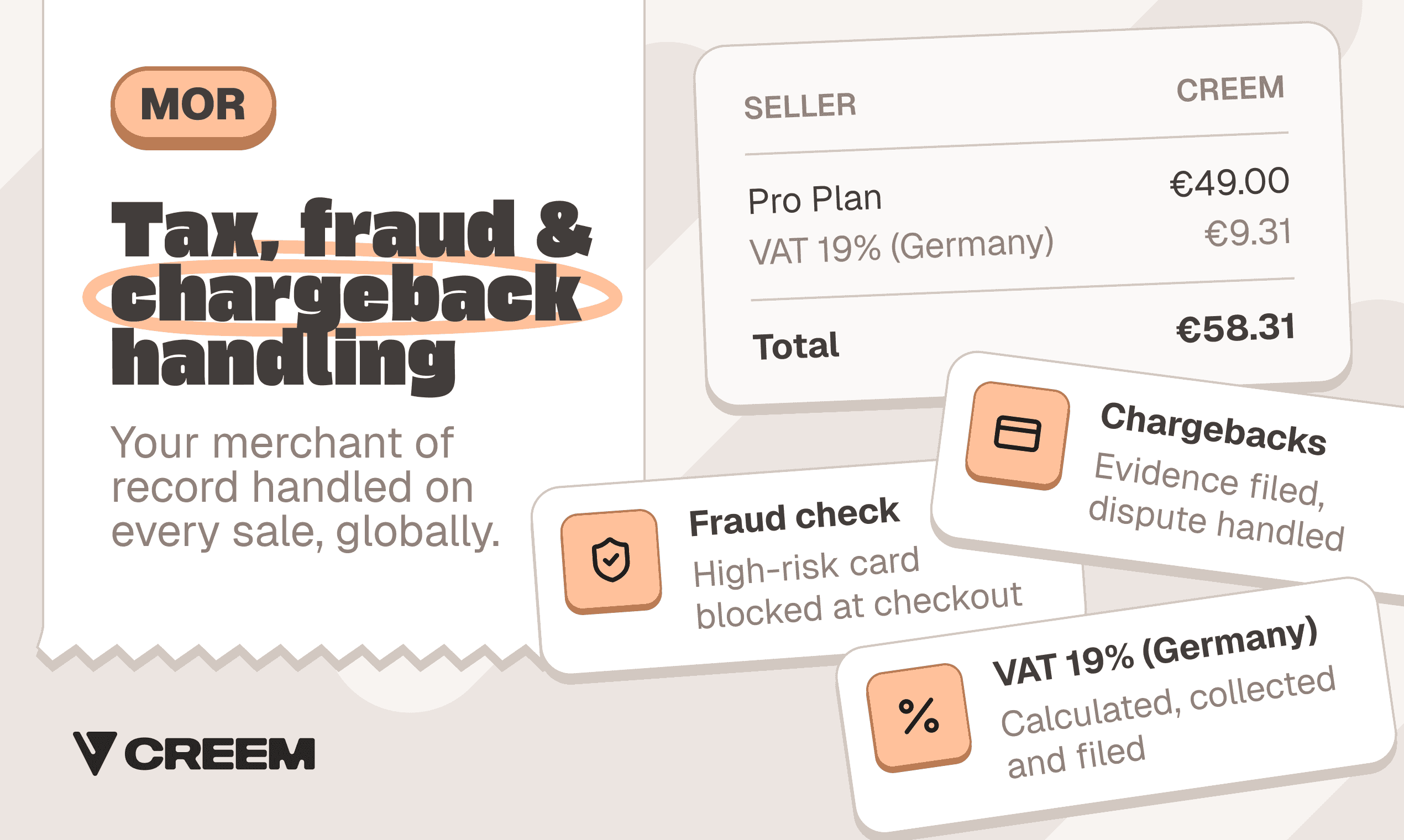
A €49 plan with 19% German VAT comes to €58.31 at checkout.
Stripe Tax calculates and collects tax on Stripe payments, but your business stays the seller responsible for registrations and filings. That means you must account for and remit the €9.31. With a merchant of record, the legal seller collects and remits it.
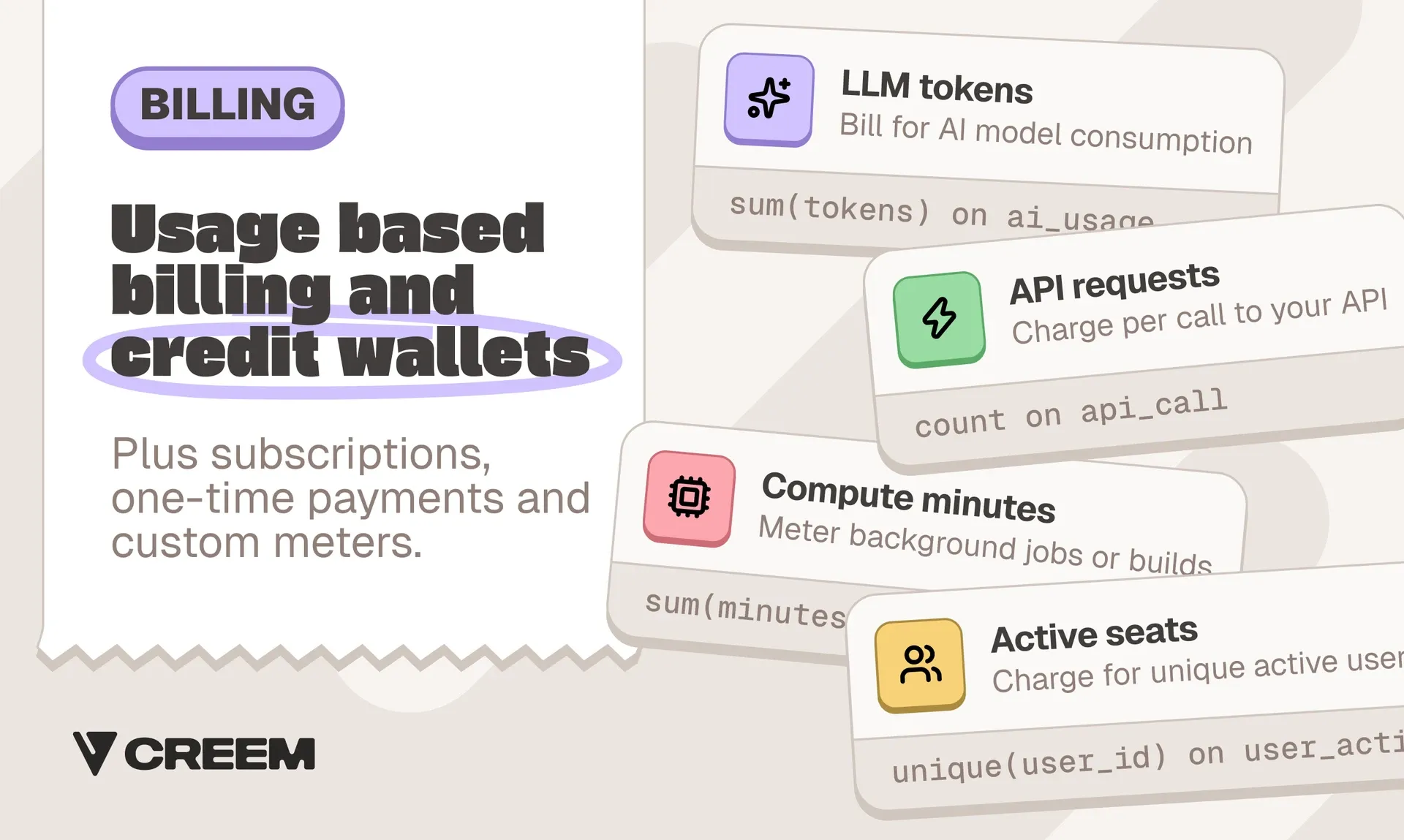
Billing is the second test, because a move to usage or credit pricing is the other point where I'd look beyond Whop. Creem bills subscriptions, seats and usage, with custom meters and prepaid credit wallets that can refill before the balance reaches zero.
Affiliates and revenue splits each add 2% before commissions on the standard plan. Looking only at transaction fees, a $100 international subscription leaves this much:
| Provider | Amount left after fees |
|---|---|
| Creem | $95.70 |
| Paddle | $94.50 |
| Dodo | $93.60 |
On that same $100 international subscription, Creem leaves $1.20 more than Paddle and $2.10 more than Dodo, with its fee covering tax, invoices and chargeback handling.
The lower fee only counts once you know which provider is the legal seller on each renewal.
What to check before you move revenue onto Whop
I would settle tax responsibility first, because it determines your duties and real cost before you get into transferring subscriptions.
Whop's merchant-of-record role covers card network rules and settlement. Its direct-sale collect-and-remit option covers only the US, EU and UK, so check marketplace treatment separately. Under collect-only, tax lands in your balance for you to remit, so the same successful charge can leave you with different filing work.
- Identify your tax mode. For each checkout channel, confirm the legal supplier, invoice seller and who registers, collects, files and remits VAT, GST and sales tax in each buyer country.
- Price real orders. Run last month's orders through your account's fees with billing and tax switched on, covering tax-inclusive and tax-exclusive prices.
- Get hold terms in writing. Include payout timing, transfer costs and verification requirements before forecasting available cash.
- Assign chargebacks. Record who submits evidence and pays dispute costs, then obtain the escalation route for an unresolved payment issue.
- Compare billing before and after import. Check subscriptions, usage, seats, credits, discounts, prorations, billing anchors, affiliate commissions and revenue splits.
- Reconcile the migration CSV. Eligible subscriptions are active or trialing cards charging at least $1, with a customer email. Stripe Link, all non-card methods and post-start card updates are excluded. Contact failed-transfer customers before their next billing date.
- Test access through renewals. Whop's
membership.activatedfires on renewals too, so make provisioning safe to repeat and check imported customers keep access through cancellation, refunds and failed payments. Ask how existing users map to imported customers and whether saved payment credentials can leave Whop later.
Stripe cancels each original subscription at period-end and emails a cancellation notice before Whop's first bill. Email subscribers beforehand so they don't read that notice as losing access.
Whop prohibits lifetime, perpetual and indefinite-access listings. Check separately whether your legacy perpetual licenses are eligible under those rules.
Need a legal seller that remits your sales tax? Try Creem
If your software team has renewals coming from everywhere, or you are moving to usage or credits, you need a legal seller that files the tax.
Creem is the merchant of record on every sale, so we are the legal seller responsible for collecting and remitting VAT, GST and sales tax, issuing invoices and handling chargebacks.
The published rate for that work is 3.9% + 40¢ per successful transaction, with no monthly fee and no setup fee. Whop's domestic one-time rate is lower, so the choice comes down to where your buyers live.
Uneed moved its payment code in minutes, changing 1,500+ lines with 3 AI prompts and 0 integration errors. New buyers pay through Creem checkout from day one, while existing subscribers authorise payment again at renewal because saved cards never carry over.
When you want the tax for buyers in 190+ countries off your desk, try Creem and list your first product.
FAQs
Is there a Whop app?
Yes. Whop has a mobile app on the App Store and Google Play, and members log in with the email tied to their memberships.
Can you earn money on Whop without selling?
Yes, through Content Rewards. A brand funds a campaign, creators post clips or original content about it, and Whop pays the creator by views once the brand approves the post.
How do I contact Whop support?
Whop AI answers at whop.com/support at any time and can see your memberships, payments and payouts. It routes complex cases to the support team, which follows up by email, and you can also write to support@whop.com.
For a held balance, ask whether a Trust & Safety review is involved. A suspension appeal goes to that team through Whop's appeal flow, and you have 30 days to file it.