
Your software works, and a buyer in another country is ready to pay. You have it down to Whop or Stripe, and the card rates sit close enough that it feels like a coin toss.
The rate is the smaller question. That sale also carries VAT, an invoice and the risk of a chargeback, and one business has to be the legal seller who answers for all three. The other question is whether the billing can charge the way your software does.
Get either one wrong and you pay for it later. That can mean tax registrations held in your own name, or subscriptions you rebuild on another system. Both can be settled before you write any integration code.
If you want someone else to be the legal seller for your software, try Creem, which we built: it files and remits tax and handles chargebacks for 3.9% + 40¢ per successful sale, with usage billing and affiliates in the same account.
Whop vs Stripe at a glance
Whop can take payments behind the app you already have, or let you sell through apps inside its communities. Stripe gives you hosted checkout and no-code payment links, with developer integrations when you want to build the payment flow yourself.
| What changes for your business | Whop | Stripe |
|---|---|---|
| Base domestic card rate | 2.7% + $0.30 per transaction, no monthly fee for processing | 2.9% + $0.30 per successful transaction |
| Legal seller, tax filing and chargebacks | Ask Whop whose name is on the invoice | Your business in a standard setup. Stripe Managed Payments is a separate seller-handoff option |
| Recurring billing | Subscriptions | Subscriptions and metered usage |
| AI credits | — | AI-credit packs and top-ups through Stripe’s token billing |
| Commerce and distribution | Commerce and memberships, plus App Store distribution when you sell as a Whop community app | Hosted and no-code payment tools connected to your app or membership platform |
The core difference: commerce platform vs payment infrastructure
Whop is a commerce platform you can sell through. Stripe provides payment infrastructure you connect to your product. The choice is how much of the customer experience you hand over, which is separate from who takes legal responsibility for the sale.
Whop
You can keep your own site and app, with Whop handling payments. Or you can build an app inside Whop communities and distribute it through the Whop App Store.
Whop features software alongside its community offerings, including Viral Coach, an AI-powered SaaS tool for generating, scheduling and publishing short-form content.
I would treat building inside Whop as a product decision, since App Store access means your app lives in Whop’s environment. If you already have an interface your customers use, integrating Whop for payments lets you keep that experience.
Stripe

Stripe homepage: "Financial infrastructure to grow your revenue" headline, Get started and Sign up with Google buttons, and customer logos
Stripe gives you no-code payment and recurring billing tools, plus hosted customer account pages. Your team can use those interfaces without building the whole payment experience itself.
You can use hosted pages where they fit and developer integrations where your product needs something custom. You decide how payments fit into your software without moving the product itself into a community environment.
Whatever mix you choose, your business remains the legal seller in a standard Stripe setup. Having less checkout to build does not mean having less responsibility for the sale.
Pricing: what you actually pay
On a $100 domestic one-time card sale, before tax, international-card, conversion or add-on charges, Whop leaves you 20¢ more than Stripe.
| On a $100 sale | Whop, base processing | Stripe, base processing | Creem, merchant of record |
|---|---|---|---|
| Transaction fee | $2.70 + $0.30 = $3.00 | $2.90 + $0.30 = $3.20 | $3.90 + $0.40 = $4.30 |
| What’s left of the $100 | $97.00 | $96.80 | $95.70 |
Creem’s $4.30 is the all-in merchant of record fee for tax collection and remittance, invoices and chargebacks. Whop’s $3.00 and Stripe’s $3.20 cover base processing only, before Stripe Tax, Stripe Billing or the work of registering and filing yourself.
Take $10,000 a month across 100 successful domestic one-time card sales, and processing costs $270 + $30 on Whop and $290 + $30 on Stripe. The monthly gap is $20.
Run those numbers with your own revenue and successful transaction count. The percentage applies to revenue, while the fixed fee applies to each sale.
Stripe Tax and Stripe Billing are optional add-ons you pay for separately. I would weigh the processing gap against the billing tools you need and the work your business still handles, including tax registration, filing and disputes in the countries you sell into.
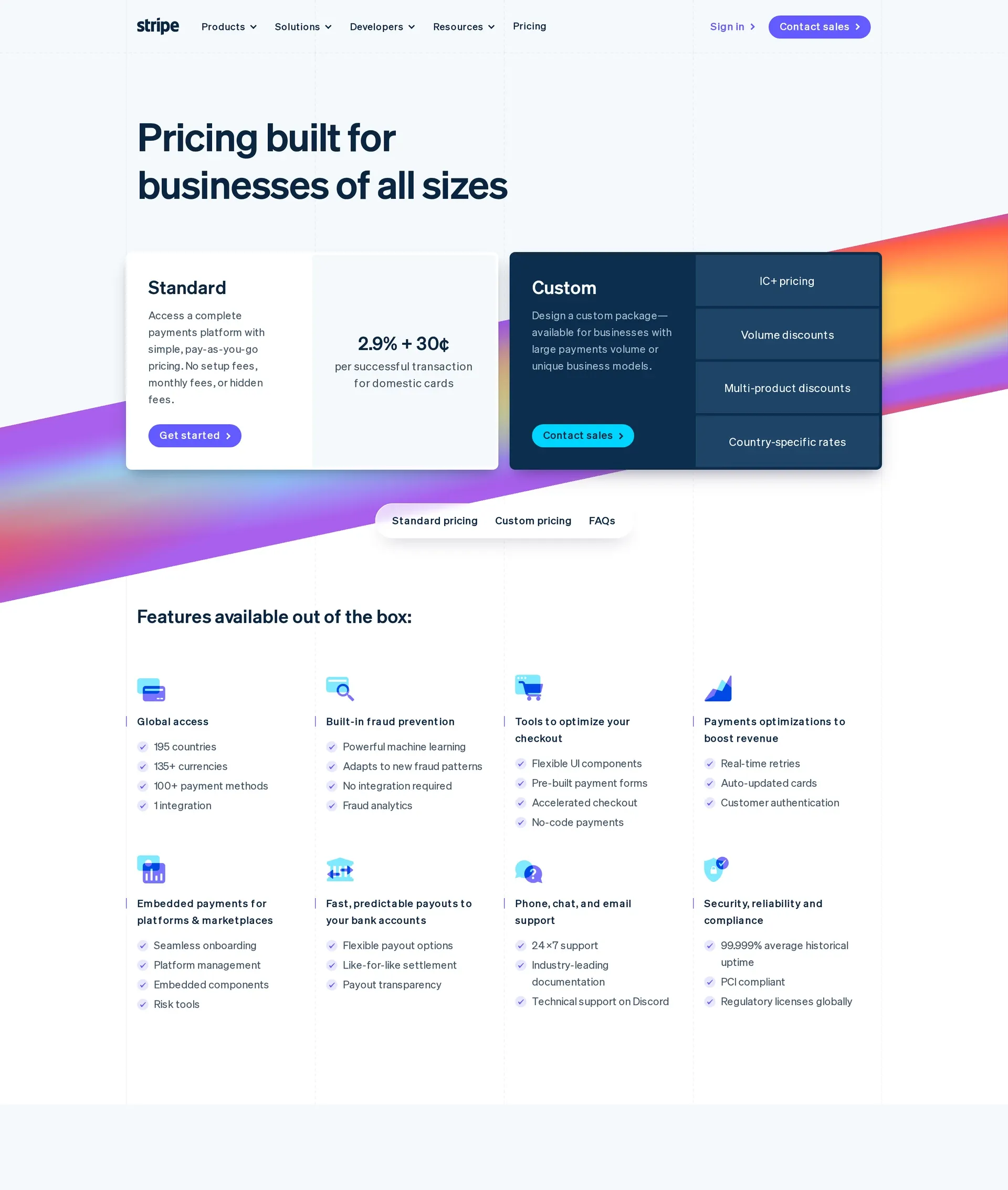
Stripe pricing page: Standard plan at 2.9% + 30¢ per successful domestic card transaction, next to a Custom plan with IC+ pricing and volume discounts
Compliance and tax: who files the VAT?
An international buyer pays, and the receipt shows the right VAT. With a standard Stripe setup, you still own any registration and return that sale requires.
Stripe Tax calculates the rate and helps you register and file, but the registrations and returns stay in your name. Your business still owns these tasks:
- Registering for and filing VAT, GST and sales tax where you owe it.
- Issuing invoices that meet the relevant country’s rules.
- Answering chargebacks with evidence.
With Whop, I would get clear answers about your payment setup before counting tax or disputes as handled:
- Whose name appears as the seller on the buyer’s invoice?
- Who holds the VAT registrations, files the returns and remits the tax?
- Who answers a chargeback?
Those answers tell you which jobs your team can stop doing.
The decision comes when you would otherwise need to hold your first VAT or sales-tax registration. If you do not want that responsibility, a merchant of record takes it on, while Stripe Tax helps you handle it yourself.
Subscriptions, usage and credits billing
A monthly renewal sets the charging date. It does not decide what goes on the bill.
Two customers can renew on the same day, but one pays a fixed price while the other pays for the tokens they consumed.
Your charging model sets the bill and determines when cash arrives:
- Flat subscription gives customers a fixed recurring price, even when their consumption varies.
- Seats make the bill grow when customers add users, regardless of how much each user consumes.
- Postpaid usage charges customers after they consume the usage.
- Prepaid credits bring cash in first, then the customer’s balance burns down as they use the product.
On a seat plan, your heaviest user can pay the same as your lightest. Meter LLM tokens instead, and the bill follows consumption.
For metered consumption, evaluate Stripe Billing, the optional billing product that sits alongside payment processing. If you sell prepaid AI credits, check whether the setup supports the balance your product needs.
Whop focuses on creator and community sales, where customers often pay for recurring access. For usage-priced software, I would first write down the unit you charge for and whether payment needs to arrive before compute is spent.
Then I would ask Whop whether its billing can count that unit and hold a prepaid balance. That gives you a concrete requirement to check before you build on it.
Checkout and getting buyers into your app
The payment went through, but the buyer still cannot use your product. Confirming payment, sending them back to your site and unlocking paid features are separate steps.
For Discord memberships, Whop takes buyers through linking an existing Discord account, selecting Claim Access and opening Discord with community access.
If you sell an app, ask Whop how that payment unlocks features inside your product.
Stripe’s hosted subscription checkout sends subscribers back to your configured success URL.
Your app, or a membership tool connected to Stripe, uses payment events to unlock the product after the first payment and keep access active after each paid renewal.
Stripe Entitlements tells your app which features a plan includes and when to turn them on or off. Your code, or the membership tool, still makes those changes.
The integration work comes down to who handles access.
Ask your team who will connect the first payment to paid features, keep access active after paid renewals and remove it when the entitlement ends.
On Stripe, those changes are your app’s job, or the job of the membership tool you choose.
Payouts, control, and lock-in
A sale clears on Whop. What lands in your bank depends on your settlement currency, your withdrawal method and whether a reserve is holding the funds.
If your business is registered outside the US, your bank must accept that country’s currency. Whop converts buyer payments, including dollars, into the regional settlement currency you choose.
For new merchants with eligible US bank accounts, next-day ACH costs $2.50. Funds held in reserve cannot be withdrawn.
Under the new-merchant schedule, an instant RTP deposit to a supported account costs 4% + $2.50, or $6.50 on a $100 withdrawal. International local-bank fees vary by country.
Whop’s seller terms allow a commercially reasonable reserve of up to your whole balance for as long as 180 days. Stripe can fund reserves from sales, deposits or bank-account debits. A payout date only applies to funds outside a reserve.
If you later leave Stripe, saved cards can be securely exported to an eligible PCI-compliant processor, apart from Link credentials. Subscriptions and payment history must be retrieved separately, and subscription billing needs rebuilding in the new system. Your Stripe history stays accessible after processing stops as long as you keep the account open.
Two questions to put to Whop directly:
- Can my buyers’ saved cards be exported to another processor?
- How do I retrieve my active subscription records and recreate billing elsewhere?
Those answers show what leaving would involve, without assuming your customers are stuck.
Whop vs Stripe: which one should you choose?
Who files the VAT, and does the billing fit how your software charges? Stripe fits teams that need custom billing and can run the selling operation themselves, while Stripe Managed Payments is a separate option for handing off more of the seller role.
Whop fits when memberships, community access and distribution are central to what buyers pay for. Here is how that choice plays out for subscription, usage-priced and community products.
For a subscription SaaS
I would choose Stripe if you need custom recurring plans and already trust your tax setup. You control the plans, but tax filings and chargebacks stay with you in a standard setup.
When a Whop renewal fails, it can provide a payment link for your app to send to the buyer. That link does not charge them until they confirm payment.
Your app still has to lock and unlock access itself.
For a usage-priced AI product
For consumption-based software, my preference between these two is Stripe. Its token billing is in public preview and supports credits in your own unit, with prepaid packs and top-ups.
In a standard setup, tax filings and chargebacks on each credit sale still sit with you.
Stripe’s ordinary billing credits apply when the invoice is finalized, and only to metered subscription items using Billing Meters. That accounts for credits on the invoice, but it is separate from reserving enough balance to run a request.
Before a request runs, check that the balance covers it, including requests already in flight. Then decide what happens when a top-up fails so unpaid requests do not keep consuming compute.
For a community or membership product
I would choose Whop if community access is central to what customers buy alongside your software. Its focus on commerce and memberships fits that purchase.
Canceling a Whop subscription stops renewal but keeps access in place through the current billing period. If your software comes bundled with Discord access, the open question is when your configured Whop integration removes the buyer’s Discord role after cancellation.
Whop vs Stripe decision tree linking software business models to tax, balance, and access checks
If neither fits how your software charges
Whop is built around creator and community commerce. Stripe’s standard setup gives you flexible billing, but you stay the legal seller and file the tax.
You may need usage or credit-based charging without being the legal seller.
Creem covers both as the merchant of record. We collect, remit and report the tax, issue the buyer’s invoice in our name and handle chargebacks on each sale.
The same account handles subscriptions, seats, usage meters for LLM tokens, API requests, compute minutes or active seats, and prepaid credit wallets with auto-refill.
One founder on Reddit left Stripe when VAT became their problem, messaged Creem’s CEO on X and had the store live in about five minutes. @madsmadsdk moved from Stripe in about two hours, including testing and an affiliate program.
You still build, deliver and support the software.
Want the legal seller and your billing in one place? Creem
Whop fits software sold alongside community access, and Stripe fits teams that want billing control and will carry the tax themselves.
Creem becomes the legal seller of your software at 3.9% + 40¢ per successful sale. The same account handles the usage billing that metered AI products need.
Creem is trusted by 3,000+ teams worldwide, including established teams such as DaisyUI.
If you would rather not carry VAT and sales-tax registrations in your own name when selling abroad, try Creem and keep your team on the software while Creem handles that tax on every sale.