

You can feel billing turn from a checkout decision into a product problem the moment a customer upgrades mid-cycle, a card fails on renewal, and someone on your team has to decide whether that user should still have access. The first charge was easy. The hard part is the system around it, which has to keep charging accurately as plans change, usage climbs, tax rules shift and customers span countries.
Pricing decides what to charge. Billing decides how to collect it, every cycle, in a way your product can trust. Most failures happen in the gap between the two. Part of closing that gap is deciding who the legal seller is: you, with tax, invoices and disputes on your desk, or a merchant of record that takes them on.
Get the mechanics right first, from proration to failed renewals, and the vendor question gets much easier to answer.
- When a simple charge stops being simple
- How does a SaaS billing system work?
- Which pricing models does your billing need to support?
- How should proration handle mid-cycle upgrades?
- How does dunning recover failed payments?
- Tax, multi-currency, and local payment methods
- How to choose a SaaS billing platform or vendor
- Treating SaaS billing as a product surface
- Should Creem be the legal seller behind your billing?
When a simple charge stops being simple
A checkout link can collect the first payment. A mid-cycle upgrade needs separate rules for when the customer gets the new features, when you calculate the extra amount for the remaining cycle, when it appears on an invoice, and when you charge the card.
If a renewal fails, you need to decide whether access continues while you recover payment. A usage-priced feature adds another requirement: tracking what the customer consumed so the invoice matches what they used.
Where teams get burned
A customer can pay and still see “subscription expired.” If the app misses the payment notification, access stays locked. Without a recovery path, a failed renewal can also cut off someone who wants to keep paying.
Postpaid usage puts your money at risk before collection. The customer has already consumed compute or API calls at your expense when the charge for that usage fails.
An international consumer’s card clearing does not finish the tax work. If VAT is due on that sale and you are the legal seller, collecting and remitting it remains your responsibility.
Separate partner spreadsheets create another gap. If an affiliate’s cut was paid out before the sale was refunded, that share needs reconciling with the refunded transaction.
How does a SaaS billing system work?
A customer clicks upgrade, the plan switches, and the charge for the difference fails. Your app cannot treat “subscription updated” as “paid.”
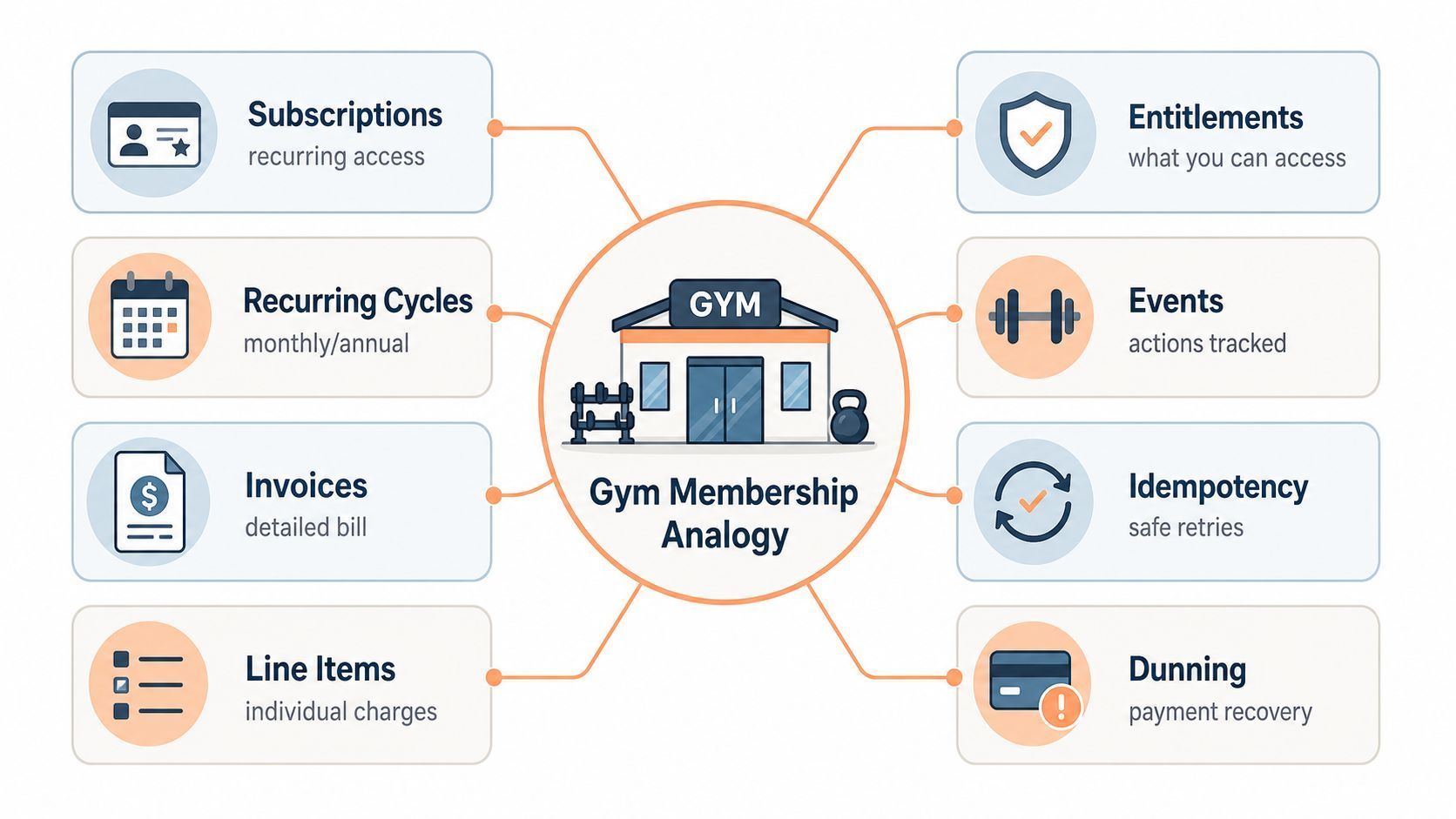
An illustration of how a SaaS billing system connects plans, invoices and access.
The core vocabulary
- Plan: the package of features and limits.
- Price: the charge per billing interval or unit.
- Subscription: the recurring agreement and its current state.
- Meter: the counter for billable consumption, such as API calls.
- Invoice: the record of charges, adjustments, and tax due.
- Entitlement: the functionality a customer can use.
- Webhook: the lifecycle notice billing sends your server.
From action to invoice
An upgrade follows these stages:
- The customer requests a new plan.
- Billing previews the proposed adjustment.
- Billing changes the subscription at the agreed effective time.
- Billing creates an invoice with any proration, the time-based adjustment.
- Billing finalizes the invoice, making it ready for payment.
- Billing attempts collection, which succeeds, fails, or needs customer authentication.
- Your app grants or holds the new features according to your access policy.
The invoice can show the prorated extra before collection happens.
What works in practice
Use verified server-side events to update access. The customer’s checkout redirect is insufficient evidence.
Store processed event IDs to avoid repeating changes when the same webhook arrives again. Alert when delivery fails, then replay missed events after fixing the endpoint.
Usage metering needs the same protection. Capture usage where it happens, give each event an ID so a retry is safe to process, and store events in an append-only log that preserves the audit trail and stops retries from counting usage twice. Keeping the raw events lets you recompute usage and change prices later without rebuilding it from old invoices.
Periodically compare payment and subscription records with product entitlements to catch missed updates. Separate test and live credentials and webhooks so a test event can never change a paying customer's access.
Which pricing models does your billing need to support?
A renewal date is only part of the job. Billing must also track whatever changes the bill: user counts for seats, consumption for usage, and balances for credits.
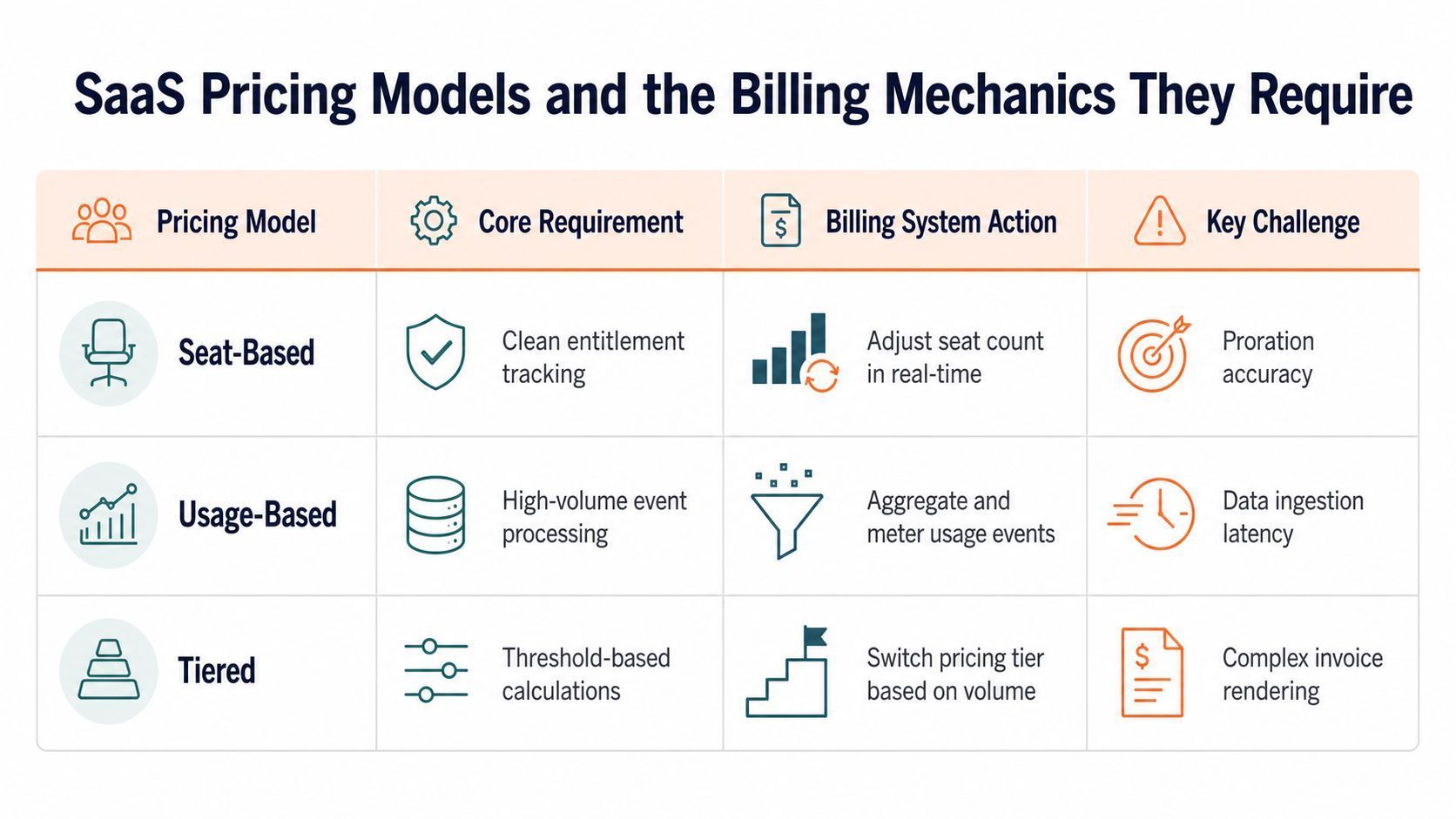
An illustration of the pricing models a SaaS billing layer has to support.
Seat-based and usage-based models
Seats bill per person on the account. Usage bills per API call, token, or generation counted this cycle, and this usage-based billing guide covers the metering that requires.
Seats fit an AI agent used as a team co-worker when each extra teammate brings roughly the same extra use. They become harder to sustain when one person’s consumption keeps growing.
For an illustrative $20 monthly seat, $5 in compute costs leaves $15 before other costs. If that user’s compute costs double to $10, the amount left drops to $10 while revenue stays unchanged.
Choose the charging unit before choosing the billing platform. Recurring payment support alone does not tell you whether it can handle changing quantities or consumption.
A capability checklist by model
Each model needs different records and rules. Test your intended pricing against these decisions:
- Seats: track counts, effective dates, and invoice adjustments for additions, then decide whether removals earn prorated credits or only lower the next renewal charge.
- Usage: tie consumption to the customer, period, and invoice, then decide whether billing sums units, takes the peak, or uses the last value.
- Prepaid credits: track grants, consumption, balances, and recharges, then decide whether an empty wallet or failed refill blocks the next request.
- Plan tiers: map prices and included features, then decide when an upgrade or downgrade takes effect.
- Hybrid: separate the base charge, included usage, and overages, then decide when the allowance resets and whether unused allowance rolls over.
How should proration handle mid-cycle upgrades?
Proration works out the money for unused time. When new features become available, when the adjustment is invoiced, and when the card is charged are separate policies you set.
A mid-cycle upgrade in plain terms
With time-based proration and the renewal date unchanged, you give back what’s left of the old plan and charge for what’s left of the new one, provided the current period was paid. An unpaid invoice needs a separate credit rule.
For an illustrative upgrade from $20 to $40 monthly halfway through the period, with the same renewal date and discounts unchanged:
- Credit unused old-plan time: half of $20 is $10.
- Charge remaining new-plan time: half of $40 is $20.
- Subtract the credit: $20 minus $10 leaves a $10 adjustment.
Add applicable tax, then subtract any existing account credit. What remains is the payment due. Show the credit and the new charge as separate invoice lines, because customers challenge math they cannot follow.
Calculate the remaining share from the actual period start, period end, and upgrade time. “Halfway” is rarely exact.
Choose whether to charge now or add the adjustment to the next invoice. Show the final amount and timing before confirmation, such as “$10 due today” when no tax or balance changes it.
Downgrades, pauses, credits, and coupons
- Downgrades: choose immediate or period-end feature changes, then separately decide whether unused time earns a credit.
- Pauses: pausing collection can still generate invoices and leave earlier retries running. Define what happens to access and accumulated invoices when billing resumes.
- Credits: reducing the next bill differs from returning money to the card.
- Coupons: saving a discount and creating this month’s adjustment are separate operations. If proration uses discounted prices, don’t discount the adjustment again.
The common failure in homegrown builds is coupling proration to checkout code. It works once, then breaks as soon as support needs to adjust one account by hand or the plan structure changes. Keep proration rules in a billing policy layer you can test separately from the app.
A good proration policy produces the same result whether the change comes from self-serve, sales, or support.
How does dunning recover failed payments?
A renewal declines on a customer who still wants your product. Dunning is billing’s attempt to collect that payment before applying the outcome for unresolved nonpayment. Access timing follows a separate policy.
Retries, grace periods, and recovery
The failure reason determines whether another attempt can help:
- Insufficient funds: schedule another attempt when the failure is eligible for retry.
- Expired or replaced card: ask for updated payment details.
- Authorization required: request approval or a missing mandate, the customer’s permission to collect. Another card attempt cannot supply that permission.
- Collection setup problem: alert operations, because the customer cannot fix your configuration.
A notice needs the problem, action, and access deadline. For example: “Your renewal payment failed because your card expired. Update your card by Friday to keep your workspace active.”
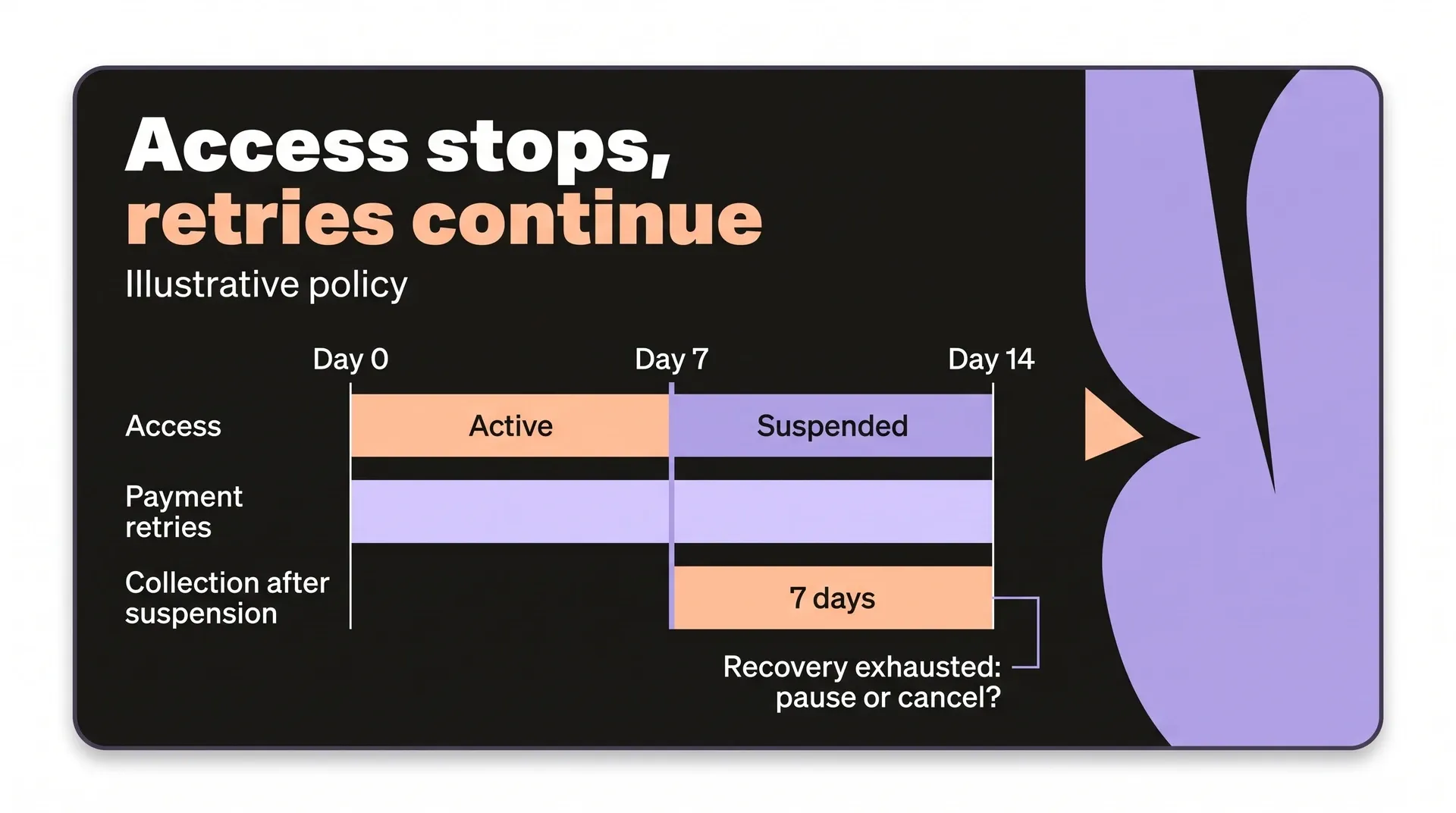
Retry duration, access, and new invoices need separate rules. In an illustrative policy, retries run for 14 days while access ends on day 7, leaving seven days of collection after suspension. The next invoice can still be created unless invoice generation stops.
Decide whether exhausted recovery pauses or cancels the subscription, and whether billing continues.
What the system should expose
Your team needs the failure reason, retry eligibility, payment method, next attempt, and required customer action. Distinguish scheduled attempts from executed ones. Record whether each failed invoice ends up recovered, canceled, or written off, because that split shows where revenue leaks and which recovery steps work.
Customers need a way to update payment details or cancel. After an update, check that the next charge uses the new card.
Why recovery belongs in the revenue layer
Collecting overdue money and restoring access are separate outcomes. Payment-failed and payment-recovered events let your app hold and restore access under your policy. A reminder email alone completes neither outcome.
Tax, multi-currency, and local payment methods
A buyer abroad pays, and the tax treatment and invoice they need depend on data your checkout collected or missed. Put these requirements into the billing design. Post-sale cleanup is too late.
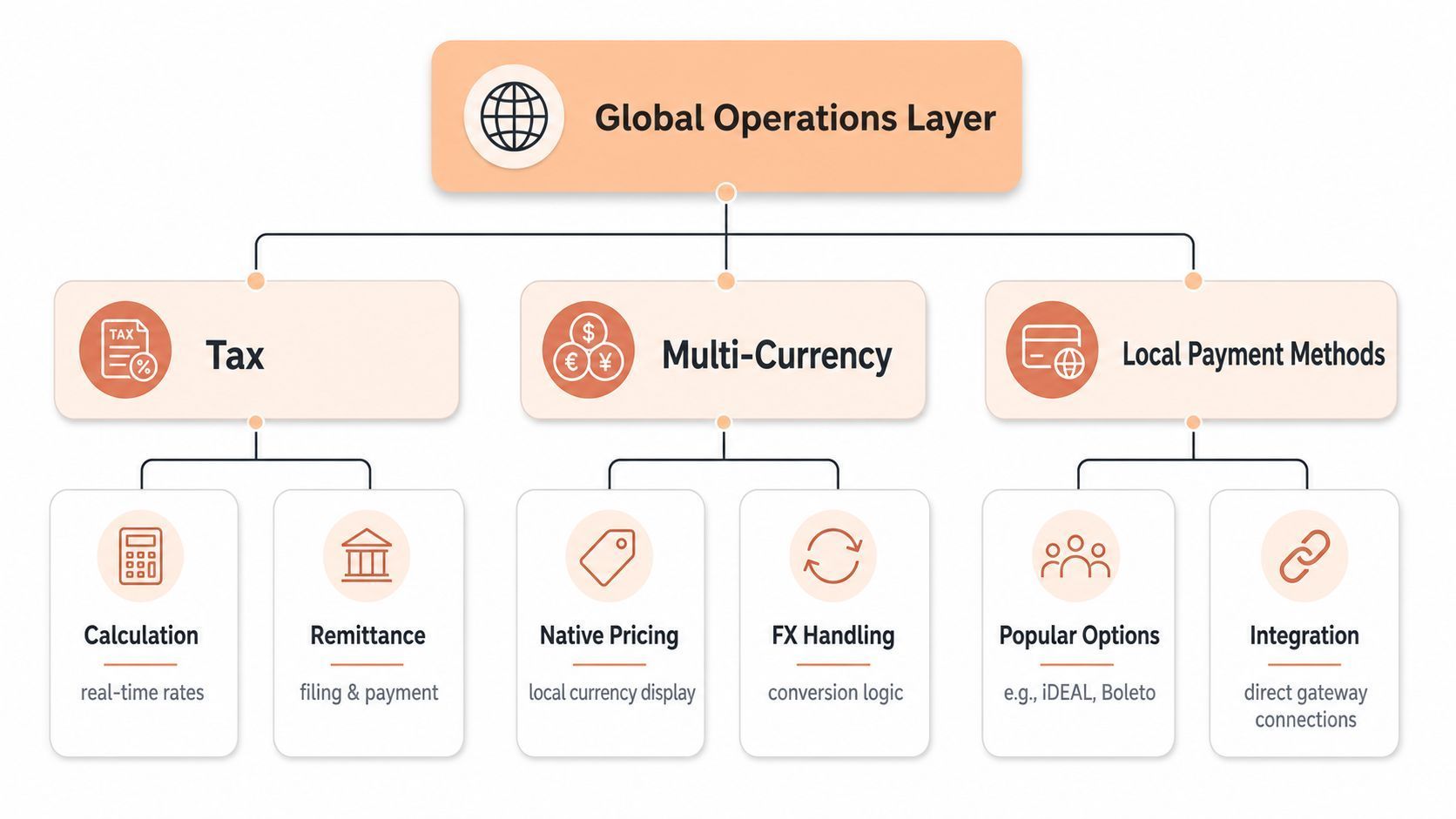
An illustration of tax, currencies and payment methods in global SaaS billing.
Tax and invoicing belong in the architecture
The useful question is where tax calculation, invoice handling and remittance should sit in your stack, and the guide to SaaS sales tax in the USA works through it for US buyers.
Billing needs answers to four questions:
- Product type: automated digital service, or a bundle including consulting or setup?
- Buyer status: business or consumer?
- Seller location: where is the seller established?
- Invoice format: PDF or structured e-invoice? A checkout that works in one market can fail in another when the format is wrong.
Multi-currency means native pricing
Native local-currency pricing is different from converting a checkout total. When a buyer sees a price in their own currency, it should be a real plan price, so trust holds and the invoice matches what they expected to pay.
Local payment methods create the same pressure. In some markets cards are not the default answer, and a billing system that ignores that loses conversions before support ever sees them. Leave room to add local methods without changing core subscription logic each time a new country is added.
Merchant of Record versus staying the seller
| Responsibility | Processor arrangement | Merchant of Record |
|---|---|---|
| Sells to the buyer | Your business | Merchant of Record |
| Issues buyer invoices | Your business | Merchant of Record |
| Handles transaction tax | Your business | Merchant of Record |
| Builds, delivers, supports the product | Your business | Your business |
Tax tools help with your own tax tasks while you remain the seller, whereas a merchant of record takes tax collection, filing and remittance into the transaction flow.
Ask who pays the amount and fees when a chargeback is lost. Before handing over the sale, check support for your seats, usage or credits and your buyers’ countries.
How to choose a SaaS billing platform or vendor
Rule out platforms that cannot run your pricing or serve your buyers. A cheap transaction won’t help if your credit wallet needs another billing system. Among those that pass, choose whether to stay the legal seller with billing and processor tooling, or delegate sales to a merchant of record.
The decision criteria that matter
- Pricing: check it runs your seats, usage meters, prepaid credits or hybrid plans.
- Markets: check buyers’ currencies, payment methods, and checkout languages.
- Responsibilities: establish who files tax, issues invoices, and fights chargebacks.
- Integration: test server-side API and webhook fit, including subscription migration.
- Time to first invoice: check for fast setup, hosted checkout, and clear docs, because delays slow go-to-market.
- Pricing changes without code: check for non-code edits, variants, and safe rollouts.
- Support: check whether a person answers when a renewal is blocked.
- Partner payouts: check whether affiliates and partners are paid from the same checkout and balance, so a refunded sale adjusts their share without a spreadsheet.
What a real option looks like
Get these terms in writing:
- Rate: percentage, fixed fee, and what triggers each.
- Included: whether tax, invoices, and disputes sit inside the rate.
- Add-ons: affiliate, split, and recovered-checkout fees, including what amount each applies to.
- Transfer cost: what each payout costs to send.
- Availability: payout schedule, minimum withdrawal, and risk hold.
How to compare vendors honestly
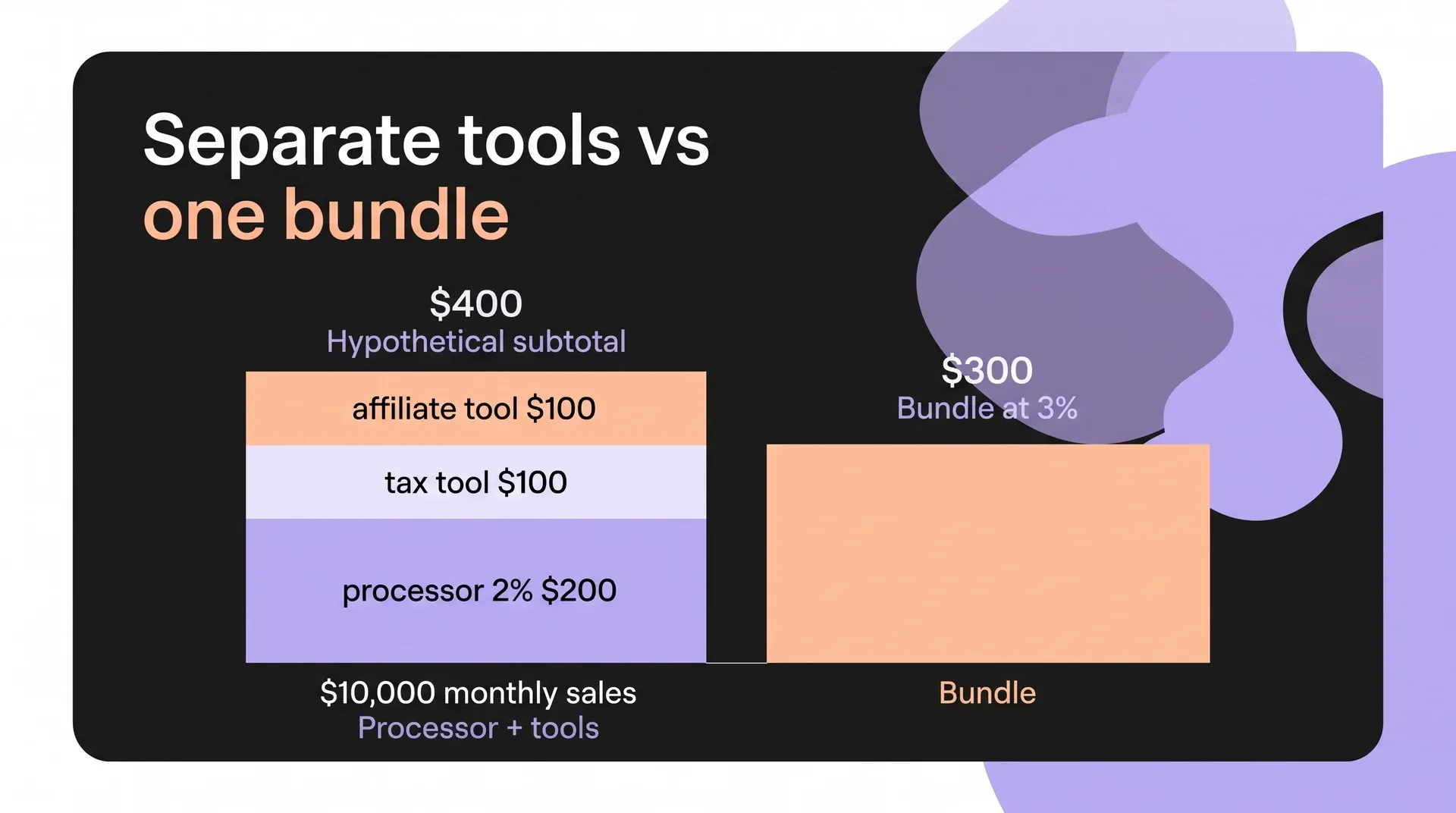
For a simplified subtotal, on $10,000 monthly sales, a 2% processor costs $200. Add a $100 tax tool and $100 affiliate tool, reaching $400. A hypothetical 3% bundle covering those jobs costs $300. For the full comparison, match scope, sales mix, and transaction count, then apply contractual fixed fees, refund, dispute, conversion, add-on, and payout charges.
Cost only the engineering, tax, dispute, and operations work each option leaves your team, using your own costs. Keep migration costs out of that figure, because you pay them once while the others recur.
Test that payment unlocks the app, a declined renewal recovers, and payouts reconcile with sales. Write down who issues invoices, files VAT, and pays for a lost chargeback.
Treating SaaS billing as a product surface
Pricing changes affect what customers owe and what they can use. Billing needs ongoing ownership, even when a provider runs the charges.
The habits that hold up
Give a named billing owner responsibility for reviewing failed renewals, disputes, and payout delays. They need a way to get each issue resolved across engineering, support, and the provider.
Pricing rules belong outside app code, because hard-coded exceptions become technical debt the moment the offer changes.
Keep these checks in the operating routine:
- Test pricing releases: run a mid-cycle upgrade and a failed renewal in test mode, checking the charge and resulting access before release.
- Match payouts: connect each payout line to orders, adjustments, refunds, disputes, and fees, then match the total to the bank receipt.
- Assign chargeback decisions: record who answers the dispute, who decides whether to refund, and whose balance absorbs the loss.
Keep the agreed service scope and an exit runbook. Ask whether saved cards can transfer to a new provider or subscribers must re-enter them, and how invoice history can be exported.
Build, buy, or delegate with the same lens
Access rules tied to your product’s meters can be worth building yourself. Owning that logic means fixing failed updates, keeping records of what changed, and checking that charges match consumption.
Buying subscription software does not make its provider the legal seller. If your business remains the legal seller, VAT, invoices, and disputes remain its responsibility.
When international selling exceeds your operating capacity, delegate to a legal seller that supports your required subscriptions, usage, credits, and partner payments. Your team still owns product delivery, performance, and support. Whichever route you choose, write down who owns tax, invoices, disputes and support.
Should Creem be the legal seller behind your billing?
If you sell SaaS or AI subscriptions internationally, the legal sale can move off your team without splitting billing across vendors. Creem is the legal seller on each transaction and collects and remits VAT, GST and sales tax in 190+ countries, so you stop being the seller in every country a card is charged. Your team still builds, delivers, and supports the product.
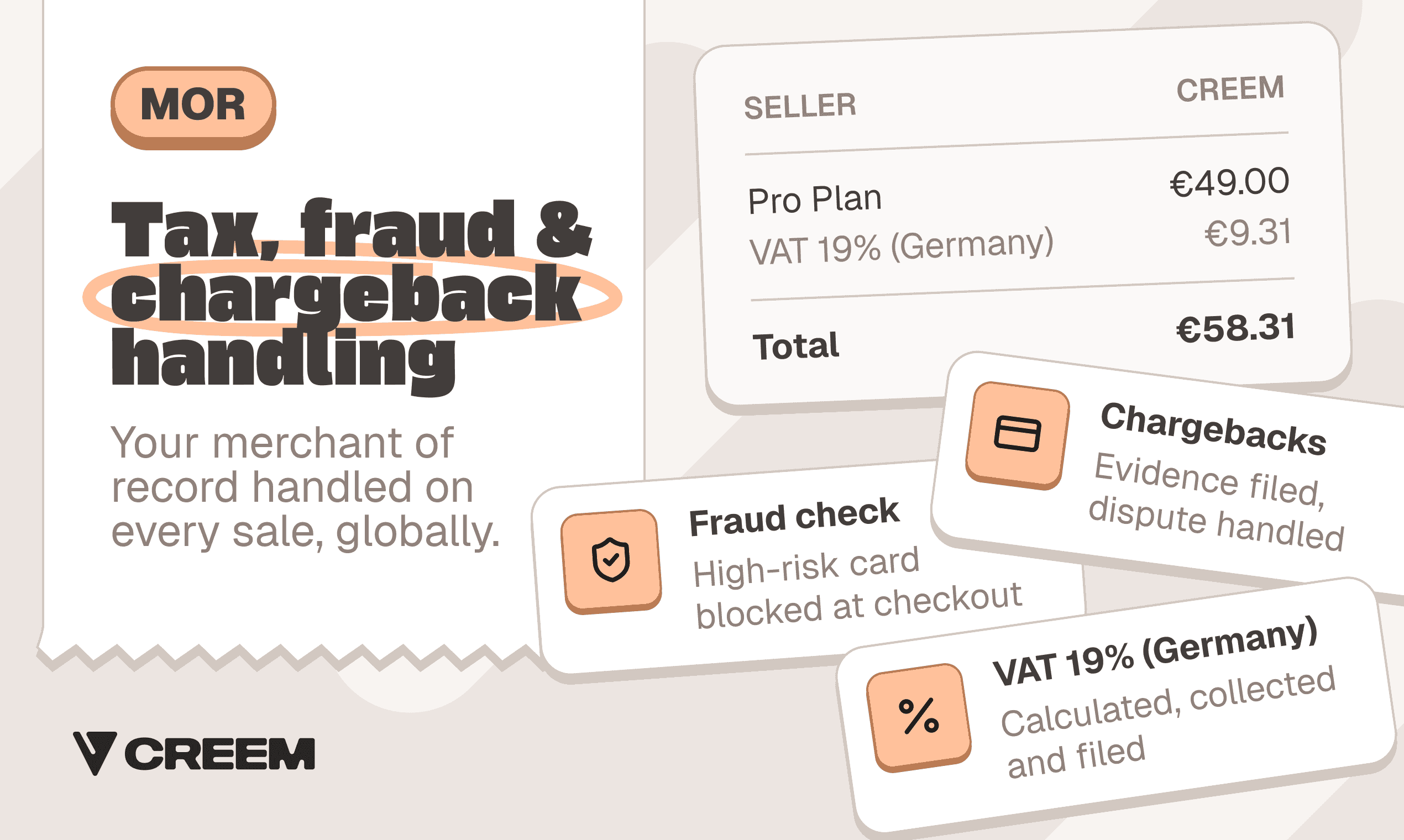
That only pays off if Creem runs the pricing your product charges and covers the countries you sell into. Subscriptions, seat-based billing with proration, usage meters and credit wallets with auto-refill run on one platform, and affiliates and partners get paid inside the same money path, with links and checkout sharing attribution. Checkout runs on your own domain, and its interface appears in 42 languages. Uneed, DaisyUI and Active Builders already sell downloads, licenses, subscriptions, credit packs and usage-priced products through Creem.
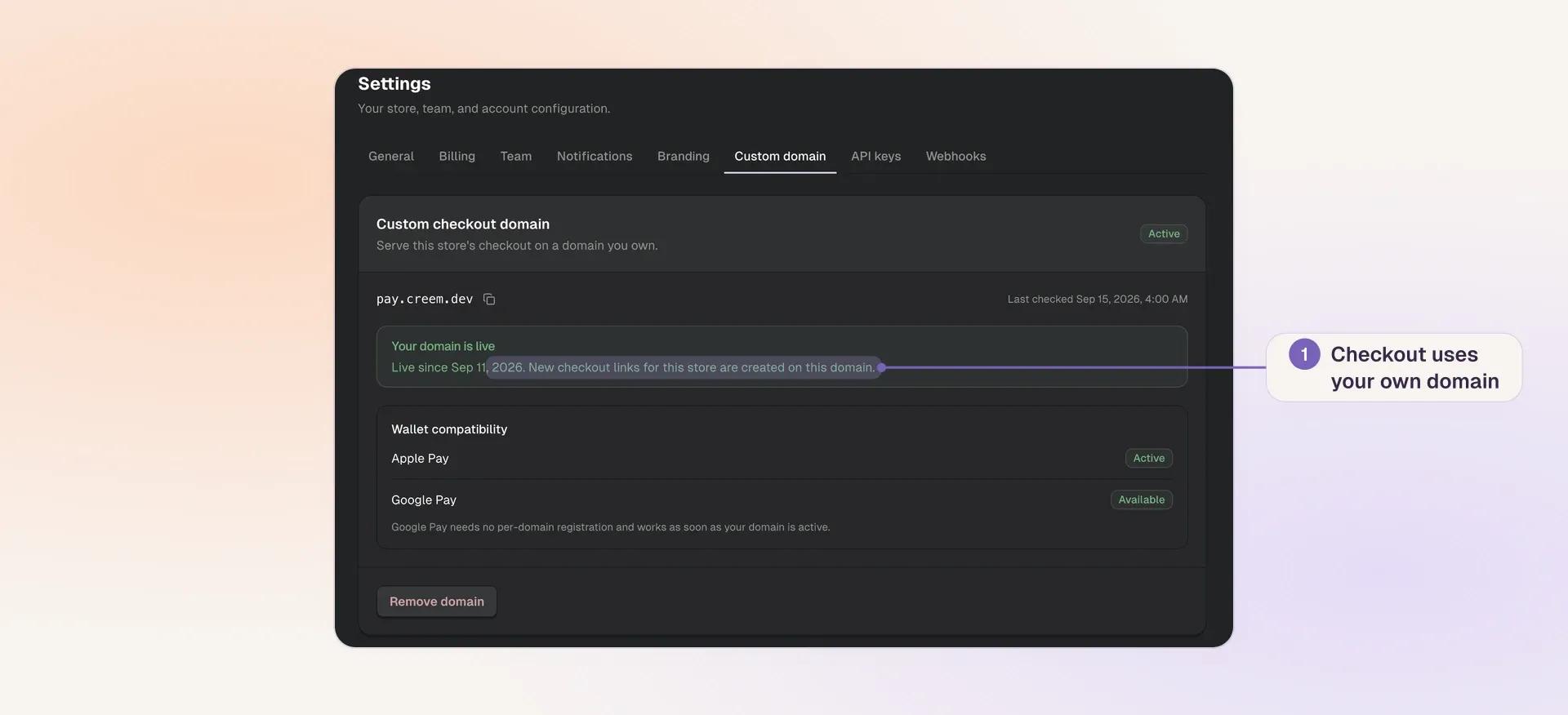
Creem custom checkout domain settings showing pay.creem.dev and Apple Pay and Google Pay compatibility
If that pricing and those countries match yours, try Creem. The tax rules of every country you sell into then stay with Creem as the legal seller and out of your codebase, so your next sprint goes to the product instead of tax edge cases.