

Your product is ready, and a Payhip store takes an afternoon to set up. For a course or a file, that afternoon is most of the work.
Sellers weighing Payhip in public tend to ask about hidden fees first. A fee comparison answers that, and still leaves open whether a flat membership can bill a software product by seat, usage or credits.
Choosing on the headline fee alone leaves part of the bill out of view. A few fee points come off every renewal, and any billing your plan can't express turns into code you build and maintain after the product has shipped.
This review works out which Payhip plan costs least at your monthly sales, which taxes Payhip remits for you, and what stays with you as the seller.
What is Payhip and how does it work?
When a buyer checks out on Payhip, payment runs through your own connected Stripe or PayPal account, and Payhip gives them access to the download, course, membership or coaching offer they bought. You list the product, and Payhip handles access after the purchase.
With a membership, subscribers get a members' area for the posts you publish, so paying buyers have one place to read and return to.
A single bundle purchase can unlock a course and a template pack together, while each product can still sell on its own in the store. Buyers who want everything pay once, and those who only want one item do not have to buy the bundle.
If you sell files, courses or a membership mostly to buyers in the EU, the UK, the US and Canada, Payhip is a good fit, because those are the regions where it remits the tax for you.
A software or AI product asks more of billing than handing over access once the card clears.
Payhip pricing: what you actually pay
Payhip charges more each month in exchange for a smaller cut of each sale.
| Plan | Monthly charge | Payhip transaction fee |
|---|---|---|
| Free | $0 | 5% |
| Plus | $29 | 2% |
| Pro | $99 | 0% |
When does upgrading to Plus or Pro pay off?
Each plan costs its monthly charge plus Payhip's cut of your sales. The figures below leave out processing, payout and currency-conversion costs, which you pay on every plan.
To find the break-even point, divide the extra monthly charge by the percentage fee you stop paying:
- Free to Plus: $29 ÷ (0.05 − 0.02) = about $966.67 in monthly sales.
- Plus to Pro: ($99 − $29) ÷ (0.02 − 0) = $3,500 in monthly sales.
Across all three plans, Free costs least below $966.67, Plus costs least between that amount and $3,500, and Pro costs least above $3,500.
At an illustrative $5,000 in monthly sales, Free costs $250, Plus costs $129 and Pro costs $99. That puts Pro $30 below Plus for the month.
Costs on top of Payhip's fee
Pro's 0% removes Payhip's transaction fee, but not your Stripe or PayPal processing charges. Any applicable payout or currency-conversion costs remain too.
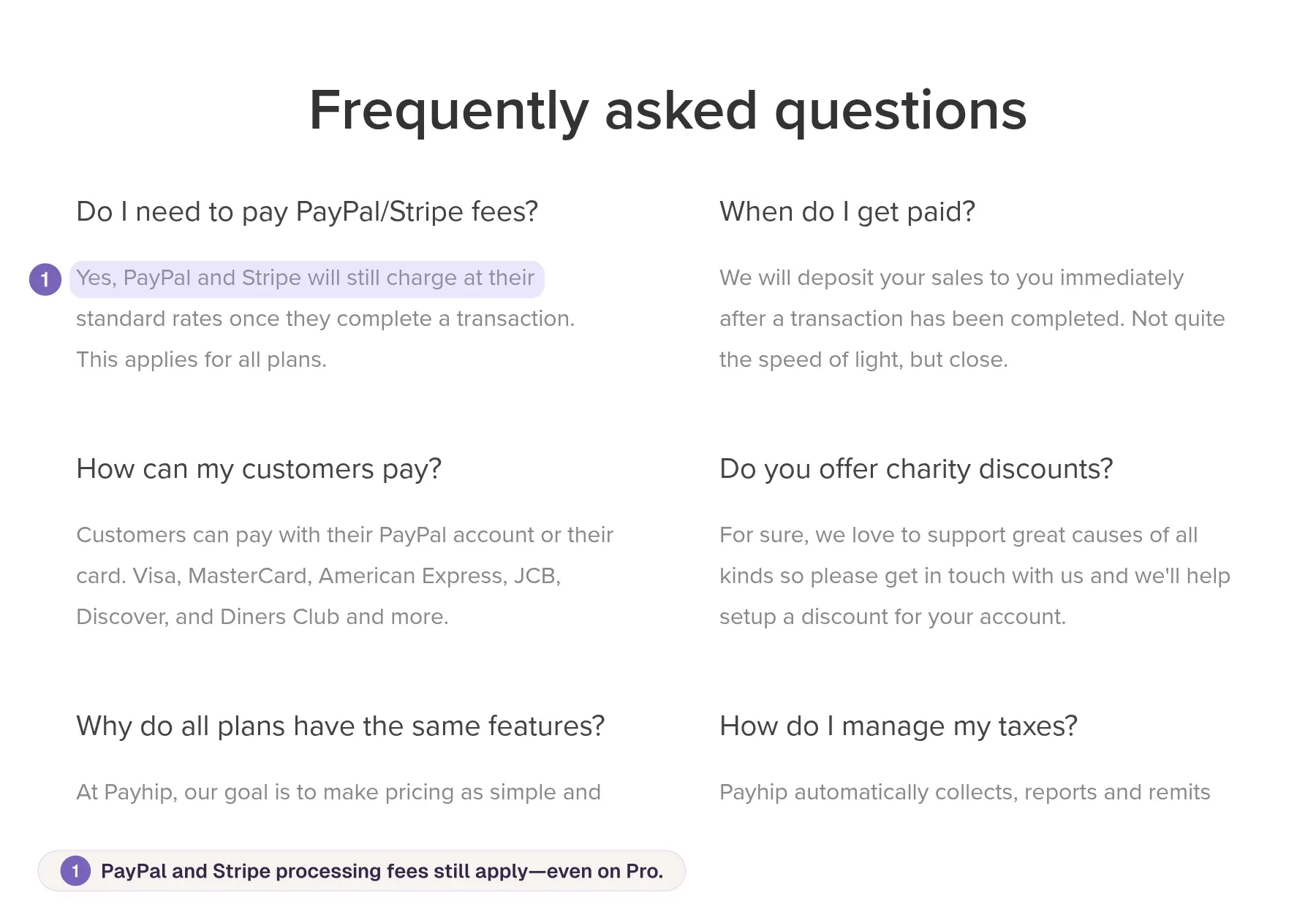
Payhip pricing page FAQ: PayPal and Stripe fees apply to all plans, with a callout noting they still apply on Pro
Tax is one cost Payhip takes off your list in four regions. It collects and remits digital EU and UK VAT and US and Canadian sales tax. For buyers elsewhere, such as in Australia, Payhip reports any other tax you set up and you file it yourself, so budget for those registrations and filings if you sell there.
I would pick the plan using last month's sales, then add processing, applicable payout and currency-conversion costs, and the monthly share of any tax filing you still do for buyers outside Payhip's regions. That monthly total, not Pro's 0%, is the number to compare with a merchant of record's rate.
Storefront, checkout, and file delivery
Your buyer encounters Payhip at two points, when they pay and whenever they return for the file or key they bought.
Store and checkout customization
Payhip gives you separate styling options for the storefront and checkout. Product checkouts support your logo, a banner, your button color and custom CSS, while course, membership and coaching checkouts support a logo and need CSS for anything beyond that.
The checkout layout and structure stay fixed. You can't replace the payment-selection controls with your own buttons, and custom JavaScript isn't supported.
CSS changes how checkout looks, not how it behaves. Buyers can still choose between your product variants, but any validation or usage-selection logic you write has to run in your own app before they reach checkout.
If your variants have descriptions, use the radio-button layout because the dropdown list doesn't show them.
Downloads, PDF stamping, and license keys
Each buyer gets five downloads by default. You can raise the limit or reset it for a buyer who runs out.
For portrait PDFs under 250 MB, PDF stamping puts the buyer's email address and purchase date at the top-left of every page.
A license key proves the buyer paid, but your software decides what it unlocks. You still write and maintain the code that gates access to features.
For software sellers, Payhip handles the payment page, variant choice and delivery, while you handle custom logic beyond variants and decide what a key unlocks.
If your product needs validation, usage choices or feature tiers that variants can't express, budget to build that logic and the key check in your own app before you commit to Payhip.
Marketing, affiliates, and subscriptions
Payhip supports recurring membership plans and an affiliate program, and it connects to external email platforms. If you sell files, courses or a membership, that covers recurring billing and a referral program.
Can Payhip handle a SaaS or AI product?
The fit depends on how you charge. A membership charges everyone the same price for the period, regardless of what they use. A usage-priced AI product charges for what each customer consumes, so it needs metered usage, credits or seats tied to the bill.
That mismatch shows up in your margin. On an illustrative $20 monthly plan, a customer who uses $2 of compute pays ten times their cost, while one who uses $60 costs you $40 more than they paid.
Each pricing model needs something different from billing:
- Consumption pricing: billing that records every unit each customer uses.
- Prepaid credits: billing that keeps a balance and lowers it as credits are spent.
- Seat pricing: billing that changes the charge as billable seats change.
If you charge a flat fee for access, a Payhip membership fits. If you charge by usage, credits or seats, name the unit you bill, such as tokens, credits or seats.
Then check that the billing system records that unit, charges for it, and tells your app when a renewal fails, so access stops when payment does. That check protects your margin per customer.
Who handles tax and payments on Payhip?
When your first sale to a buyer abroad clears, the money lands in your Stripe or PayPal balance, but someone still has to handle the tax. "Handles tax" covers four separate jobs:
- Calculating: working out how much tax the sale owes.
- Collecting: adding that amount to what the buyer pays at checkout.
- Remitting: paying the collected tax to the tax authority.
- Being the legal seller: owning the registration, the filings and the liability if any of it is wrong.
On Payhip, payments still run through your own Stripe or PayPal account, but for buyers in four regions Payhip takes on the first three jobs. It collects and remits digital EU and UK VAT by default, and since July 1, 2026 it has collected and paid US sales tax, as a marketplace facilitator and at no charge, and Canadian GST/HST and PST.
What stays with you is the tax outside those regions and the payment account itself. You can set up other taxes in Payhip, but it reports them to you to file. Quebec's QST stays with you, a seller with a physical presence in a US state may still have to file a return there, and disputes on your sales arrive in your own Stripe or PayPal account for you to answer.
In my view, the first time a sale outside those regions means registering and filing tax yourself is the point to consider a merchant of record. Until then, Payhip with your own processor does the job.
Once you face that registration, compare the cost of a tax tool, filings and your own hours with a merchant of record that handles registration and filing, and carries the liability as the legal seller.
What sellers like about Payhip
If you have one product ready and no sales yet, keep an eye on the cost you pay whether anything sells or not. Payhip's free plan has no monthly platform subscription.
That matters most in a slow month, when no sales means $0 in platform fees on Free against $29 on Plus. Your launch can stall without a bill arriving, but Free covers the subscription, not the cost of each sale.
The storefront builder handles the rest of the launch. You get a store page for downloads, courses and memberships without having to build a site first.
The free plan gives you a cheap way to find out whether a product sells. Launch on Free and watch your actual monthly sales for a few months.
On Free, Payhip takes 5% of each sale, so it stays the cheapest plan until monthly sales reach the Free-to-Plus break-even of about $966.67.
Where Payhip falls short
Your product can be finished, priced and ready to list, but still fall outside what Payhip lets you sell.
Payhip lists the products it won't host, but says the list isn't complete. A product isn't automatically allowed just because it isn't listed. The named categories include:
- Lead lists and supplier databases, including vendor lists sold as data.
- Scraped personal data, meaning scraped records that contain third-party information, such as contact details pulled from other sites.
- File hosting or sharing services, where buyers pay to store or share files.
That last category is easy to misread. Selling a downloadable file, such as a template pack or an ebook, is ordinary Payhip use.
The restriction applies to services where buyers pay to store or share files. An app that accepts uploads as one feature is a different case.
Most sellers of courses, templates and downloads won't run into these restrictions. For software and data sellers, the product rules can decide the platform before fees do.
My test is to describe what the buyer actually pays for in one sentence and check it against Payhip's list before you build the store.
If that sentence reads like storage, file sharing, leads or scraped records, check it against the next platform's acceptable-use or prohibited-products list before you sign up.
Payhip vs Gumroad, Lemon Squeezy, Paddle, and Creem compared
These five platforms differ on three things: who is the legal seller on each sale, how much the platform takes, and whether its billing fits the way you charge.
| Platform | Legal seller | Fee per sale | Tax registration and filing |
|---|---|---|---|
| Payhip | You, through your own Stripe or PayPal | 5% on Free, 2% on Plus ($29 a month), 0% on Pro ($99 a month), plus Stripe or PayPal fees | Payhip's for digital EU and UK VAT and US and Canadian sales tax; yours elsewhere |
| Gumroad | Gumroad, as merchant of record | 10% + 50¢ | Gumroad's |
| Lemon Squeezy | Lemon Squeezy, as merchant of record | 5% + 50¢ | Lemon Squeezy's |
| Paddle | Paddle, as merchant of record | 5% + 50¢ | Paddle's |
| Creem | Creem, as merchant of record | 3.9% + 40¢ per successful transaction, no monthly or setup fee | Creem's, for buyers in 190+ countries |
At $5,000 in monthly sales with a $50 average order, Creem's 3.9% comes to $195, and 40¢ on each of 100 orders adds $40, bringing the fee to about $235.
Payhip Pro costs a flat $99 plus processing at the same sales volume, while Paddle's 5% + 50¢ comes to $300 on the same $5,000 and 100 orders.
Those two numbers don't measure the same thing. Creem's 3.9% + 40¢ includes processing, while Pro's $99 sits on top of your Stripe or PayPal fees. At Stripe's US rate of 2.9% + 30¢ for domestic cards, the same 100 orders add $175, so Pro comes to about $274.
Pro pulls ahead as volume grows. With $50 orders on domestic cards, Pro plus Stripe costs less than Creem's 3.9% + 40¢ once monthly sales pass about $8,250. Stripe adds 1.5% on international cards, and at that rate Pro plus Stripe stays above Creem's rate at any volume.
Pro is the better deal when your sales sit above that point, your buyers mostly pay with domestic cards in the regions Payhip covers, and you are happy to answer disputes from your own Stripe or PayPal account.
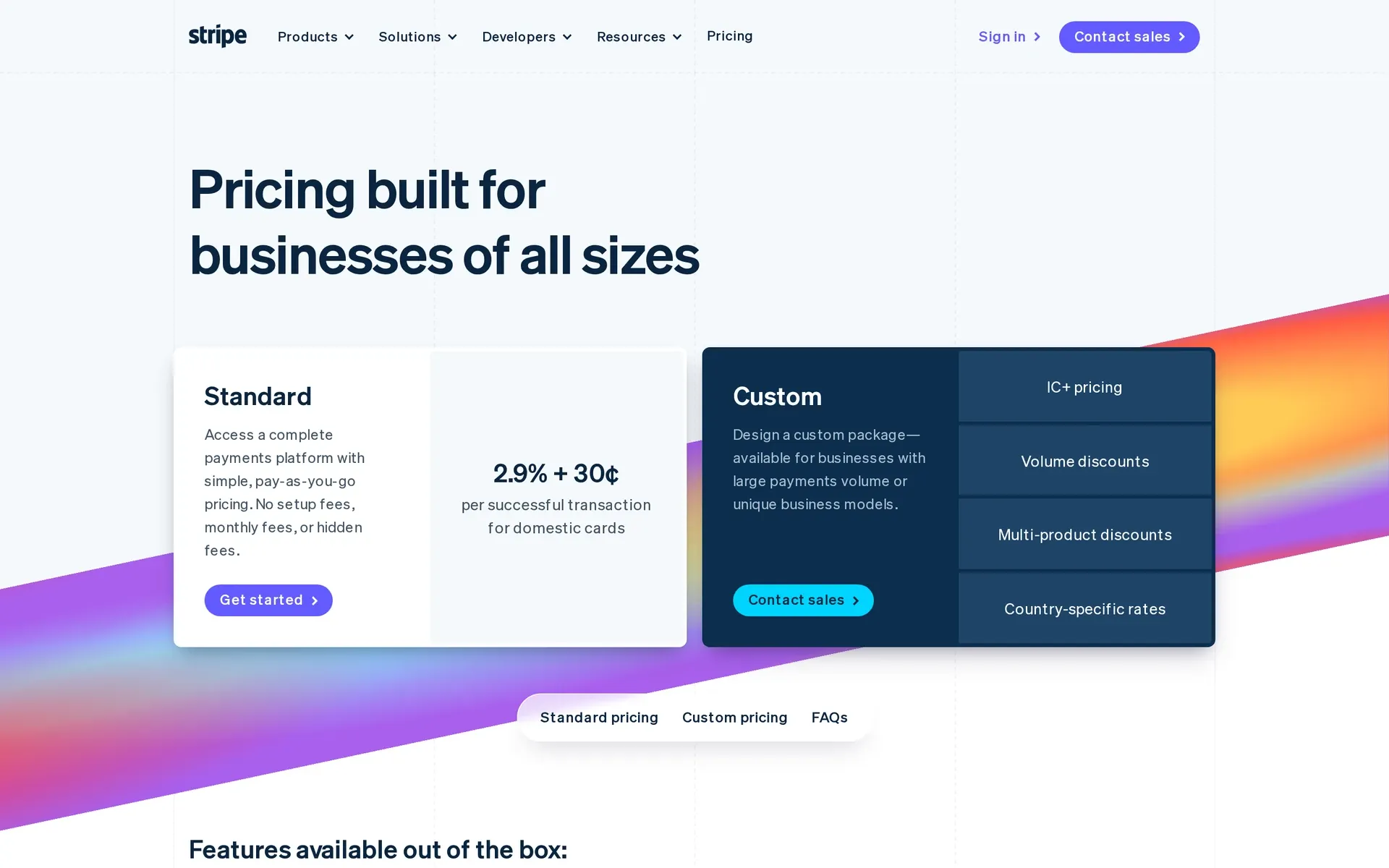
Stripe pricing page: Standard at 2.9% + 30¢ per successful domestic card transaction, alongside Custom pricing options
Billing is the second split, and Payhip's flat recurring memberships need Stripe. Creem bills subscriptions, seats, custom meters and prepaid credit wallets with auto-refill from the same account that takes the payment.
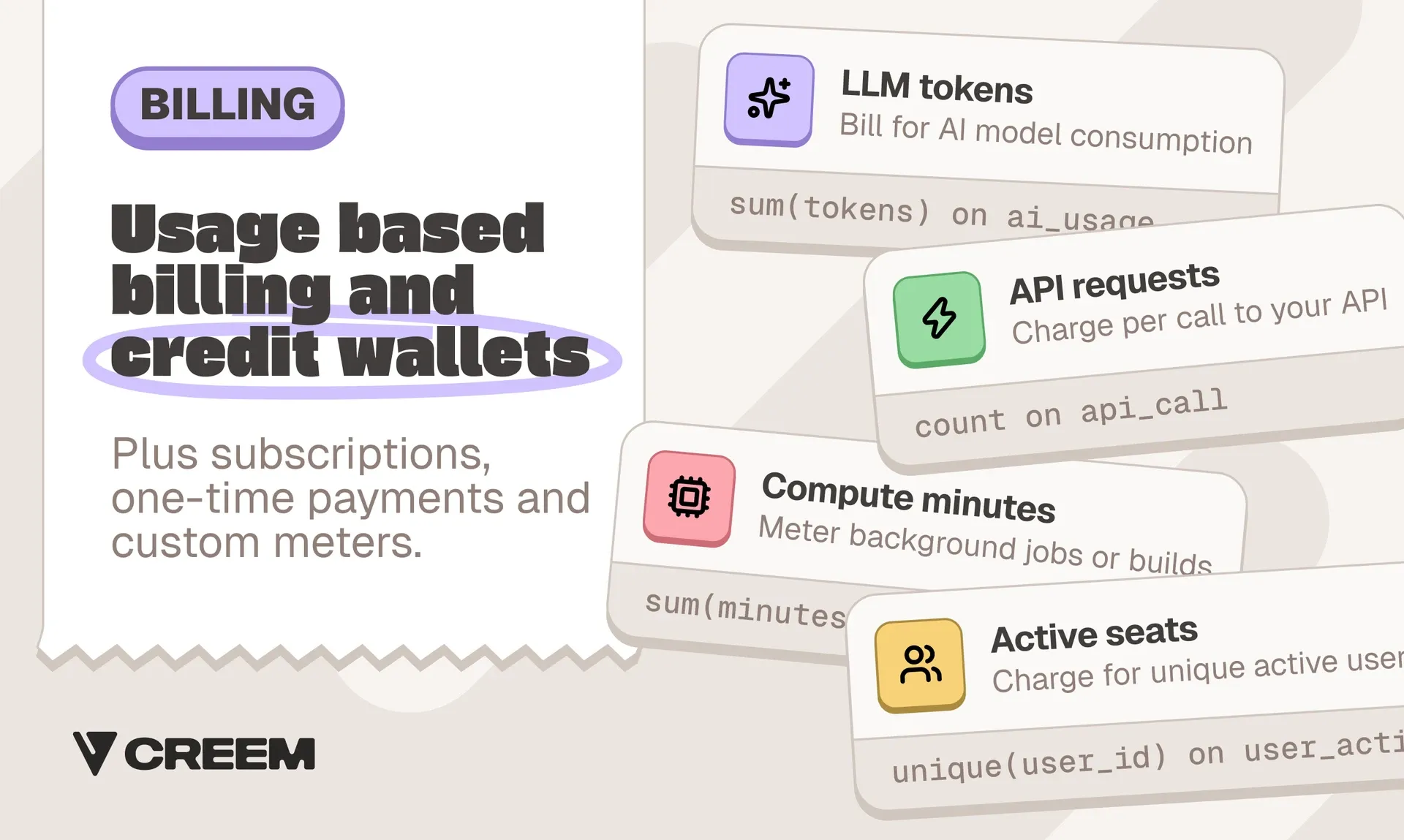
It also issues license keys with activation limits, and its subscription events tell your app when to grant or revoke access.
Both run affiliate programs. On Creem's standard plan, affiliates and revenue splits each add 2% before commissions are calculated.
I would compare the legal seller first, the billing model second and the fee third.
Compare the Payhip rows if your buyers are mostly in the regions where Payhip remits tax and you sell flat memberships, or the merchant-of-record rows if you need someone else to file tax in more countries or you bill by meters and credits.
How to choose a Payhip setup for your product
Choosing a Payhip plan is not the same as choosing Payhip. Each plan trades a monthly fee against Payhip's per-sale fee, so your monthly sales determine which plan costs least.
Some limits apply to every plan, including the cancellation rule. On Payhip, a subscriber who cancels loses access immediately, even during a period they already paid for, and that applies on Free, Plus and Pro.
On an illustrative $30 monthly plan, a buyer who cancels on day 5 loses the remaining 25 days of access they paid for. Upgrading doesn't change that.
Work through three questions in order:
-
Where are your buyers, and who should be the legal seller? Payhip remits the tax for buyers in the EU, the UK, the US and Canada. If you also sell elsewhere and want someone else to register, file and carry that tax, you need a merchant of record. No Payhip plan changes that.
-
How does your product charge? Recurring payments on Payhip need Stripe and charge a flat price for access to a bundle, membership, course or coaching offer.
If you charge per use or sell credit packs, ask whether a platform meters usage and keeps a prepaid balance per customer, which not every merchant of record does.
-
How should access end? State Payhip's cancellation rule in the product description if buyers expect access to the end of a paid period. That cuts refund requests and disputes after cancellation.
Payment-plan buyers keep access for life, so for a set access period, note the end date and remove access yourself.
I would keep a seller on Payhip for simple files, courses or a membership when most buyers are in the regions where Payhip remits tax and the seller is comfortable answering disputes from their own Stripe or PayPal account.
Need billing that fits your software? Try Creem
For files, courses or a membership sold mostly to buyers in the EU, the UK, the US and Canada, Payhip is worth it, and the remaining choice is the plan that fits your monthly sales.
Software sold to buyers in many more countries is different. Outside Payhip's four regions, each registration and filing those sales trigger is yours, and every dispute lands in your own Stripe or PayPal account.
Creem bills the way software charges. Buyers get a license key the moment they pay, and every subscription comes with failed-payment recovery and a customer portal, on the same account that bills seats, meters and credits.
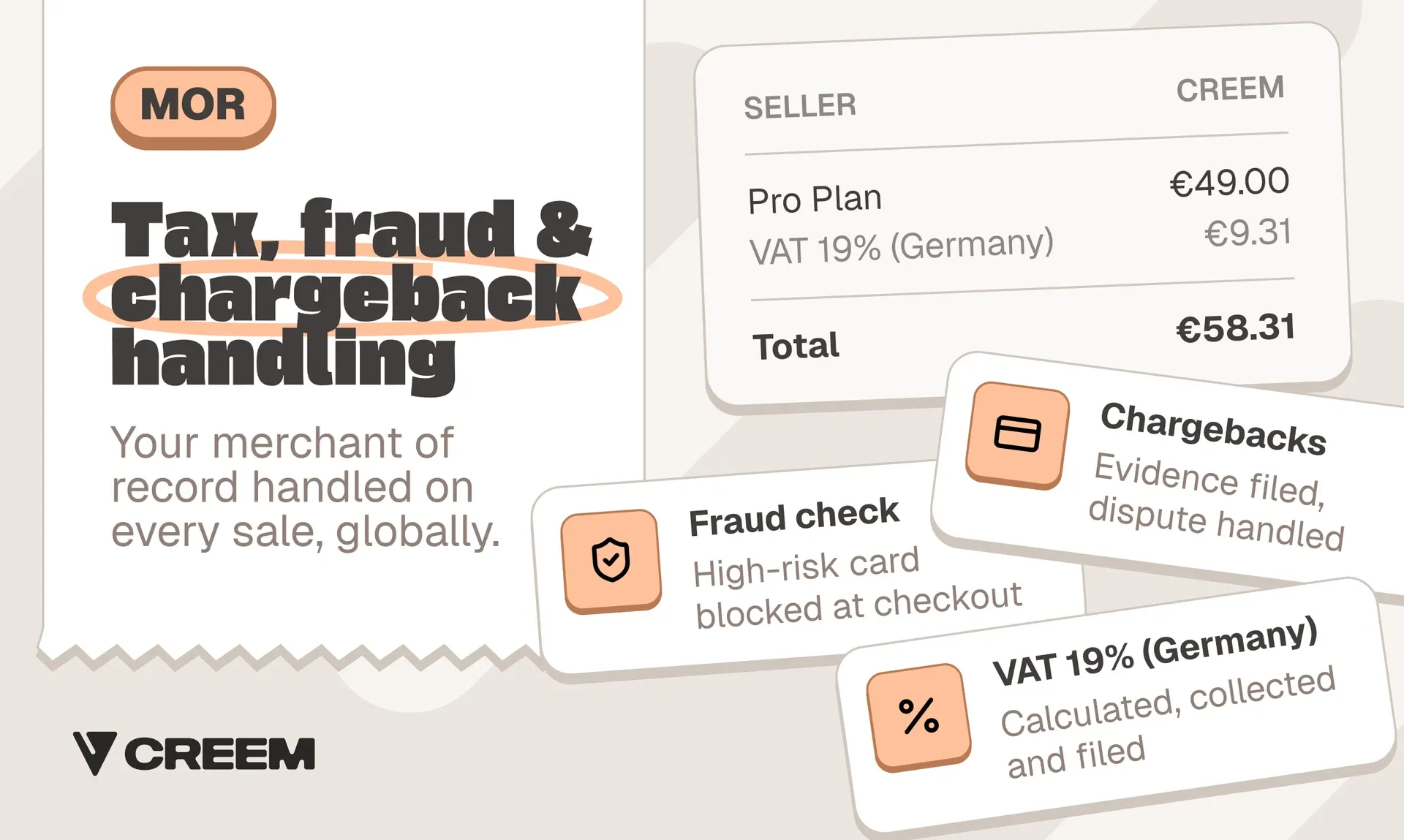
As the merchant of record, Creem is the legal seller on every sale. We calculate, collect and remit VAT, GST and sales tax for buyers in 190+ countries, issue invoices and handle chargeback disputes, all for 3.9% + 40¢ per successful transaction. You still bear the cost of a chargeback, meaning the disputed amount plus a 25 USD/EUR fee.
If your product bills by seat, usage or credits, or your buyers reach well past Payhip's four regions, try Creem and run the billing and the tax from one account.