
Most advice on how to sell software as a service starts with acquisition. Pick a market, build a landing page, offer a free trial, and sort out billing, tax and payment recovery once customers arrive. That order is backwards.
Your first transaction decides more than whether money reaches your bank account. It sets which countries you can sell to, how you show prices, how refunds work, whether a customer can change plans smoothly and whether a failed card costs you a renewal. Payment architecture is product architecture.
The biggest piece of it is who sells. On a plain processor setup, the legal seller is you, so the VAT on a sale to a consumer abroad, the invoice and the chargeback are yours too. Settle that alongside your price and access rules, before your marketing has a chance to work. We'll take those calls in the order they bite, then get to the first customers who'll pay you.
Table of Contents
- What do you need to decide before the first sale?
- How should you price and package a SaaS product?
- Merchant of record or direct merchant?
- How do you connect subscriptions to product access?
- Who owns failed payments and recovery?
- How do you handle global tax from day one?
- How do you find and close your first paying customers?
- Your first week and first 30 days
- Sell your SaaS worldwide with Creem as the legal seller
What do you need to decide before the first sale?
Your first sale needs a buyer who will actually pay, a price live on checkout, a decision about who legally sells the product and takes responsibility for tax and payment liabilities, and an account that unlocks after payment. Get that purchase-to-access path working before designing a sales operation for customers you do not have yet.
More pricing tiers and a sales hire can wait. Buyers asking for another package, or worthwhile deals stalling without personal help, give you a reason to expand.
Self-serve, assisted or enterprise sales?
A stranger should be able to land on your pricing page, understand the offer, pay and reach their first useful result without emailing you. If your product passes that test, start with self-serve:
- Self-serve: Buyers sign up, pay and begin using the product without a sales call.
- Assisted: A call or async help gets a buyer past setup, migration or internal sign-off.
- Enterprise: Security review, procurement and negotiated contracts involve multiple stakeholders. Treat this as a later step when buyer requirements and contract value justify the work.
A migration call can be worth your time when it unblocks a valuable customer. Making every buyer book one adds work to purchases that could happen without you, so keep calls optional unless there is a reason to intervene.
Self-serve still sends some support your way, such as a confused signup or a declined card.
How should you price and package a SaaS product?
Charge for a unit the buyer recognizes. If your AI product completes tasks, a price per completed task can be easier to understand than a bill based only on internal compute consumption.
On the pricing page, put the included features beside the task allowance and the price of each extra task, so buyers can work out the bill before paying.
Flat-rate, per-seat, usage-based or hybrid?
| Model | How the buyer pays | When it fits | The trap |
|---|---|---|---|
| Flat-rate | Fixed recurring price | Costs stay consistent within package limits | Unlimited usage raises costs without raising revenue |
| Per-seat | Recurring price per user | Headcount tracks value and consumption | Heavy users cost more without paying more |
| Usage-based | Price per measured unit | Consumption tracks value and costs | Bills are hard to anticipate without spending limits |
| Hybrid | Base subscription plus overages | Buyers need baseline predictability while usage varies | Unclear allowances or overage rates cause surprises |
A base subscription gives buyers a predictable starting bill, while overages bring in revenue for billable usage beyond the included allowance. That makes hybrid pricing a useful starting point for SaaS and AI products whose usage varies by customer. The guide to usage-based pricing for software covers how usage can shape packaging.
For an illustrative $20 subscription including 100 tasks, with $0.10 overages and a $0.05 cost per task, 110 tasks produce a $21 bill and $5.50 in task costs. That leaves $15.50 before other costs, compared with $14.50 on an unlimited $20 plan at the same usage.
The margin holds as long as the allowance sits near typical consumption and each overage is priced above its incremental cost.
Build tiers around a buying decision
Offer three tiers only if each one serves a distinct customer situation. The entry plan should solve a real problem on its own, so a buyer who stops there still gets value. The top plan should make the value of greater capacity, support, governance or automation obvious.
A middle plan can anchor the decision, as long as someone could reasonably buy it. Skip any decoy tier that exists only to push buyers elsewhere.
Merchant of record or direct merchant?
Whose name is on the buyer’s invoice, and who owes VAT when a German consumer’s card clears? With a processor, you are the legal seller. With a merchant-of-record setup, the platform sells on your behalf and owns the transaction-tax obligations for covered sales.
Who handles tax, chargebacks and control in each model?
| Responsibility | Direct merchant | Merchant of record |
|---|---|---|
| Transaction taxes | You calculate, collect, file and remit, even if a tax plugin does the math. | Platform collects and remits VAT and sales tax as the seller. |
| Buyer invoices | You issue them through your billing service. | Platform issues them. |
| Fraud and chargebacks | You manage controls and disputes with your provider. | Platform screens payments and handles disputes. Financial loss follows its agreement. |
| Checkout control | Your tools set customization limits. | Platform rules set customization limits. |
| Cost structure | Payment processing plus tax tooling and operating costs. | One platform fee, usually easier to forecast. |
Product delivery and support stay with you in either model.
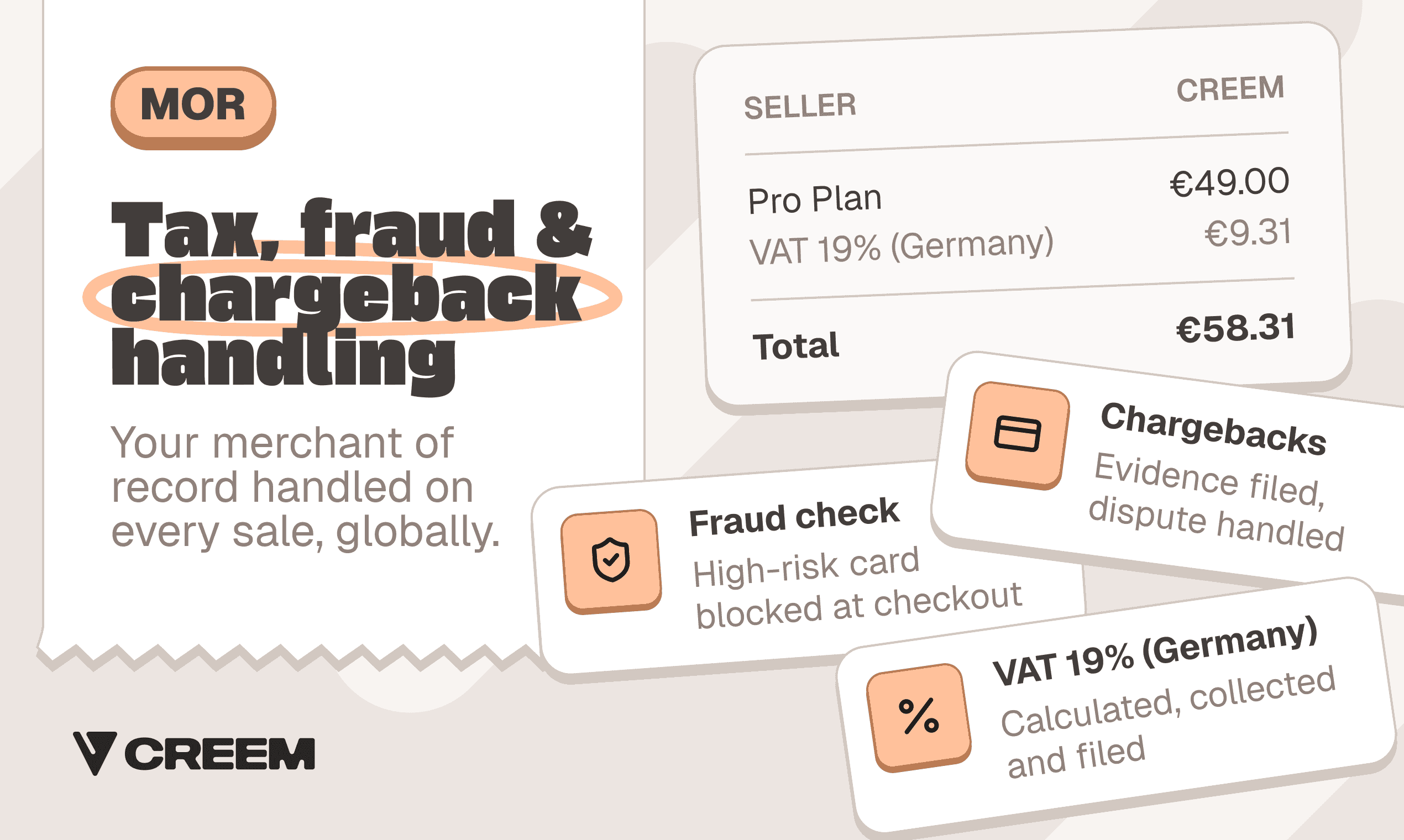
Illustration of a merchant of record handling transaction taxes, fraud and chargebacks.
Which payment methods do your buyers expect?
Start with cards, then add PayPal, Apple Pay, Google Pay and regional methods where your buyers already use them. A method that cannot renew a subscription only helps with the first payment, so ask the provider: “Can each method handle renewals, and will buyers see their own currency at checkout?”
Hosted checkout is usually the fastest route to a reliable launch. Embedded checkout gives you more control over the purchase flow, and with it more responsibility for authentication, accessibility, error states and payment-method compatibility.
Match the architecture to your actual market
Score each option against three constraints: where your buyers are, how much revenue you expect and how much engineering time you can give billing. Are most buyers consumers or small teams abroad? Start with a merchant of record for SaaS. If you sell to domestic businesses and prefer a processor, first name who files transaction taxes and defends disputes in every market you serve.
Direct registration becomes worth revisiting once revenue grows and sales concentrate in a few countries, because the extra control can then cover the cost of running compliance yourself.
How do you connect subscriptions to product access?
A checkout redirect tells you the buyer returned to your app. It does not authorize paid access. Your app needs a verified billing event tied to the account or organization that made the purchase.
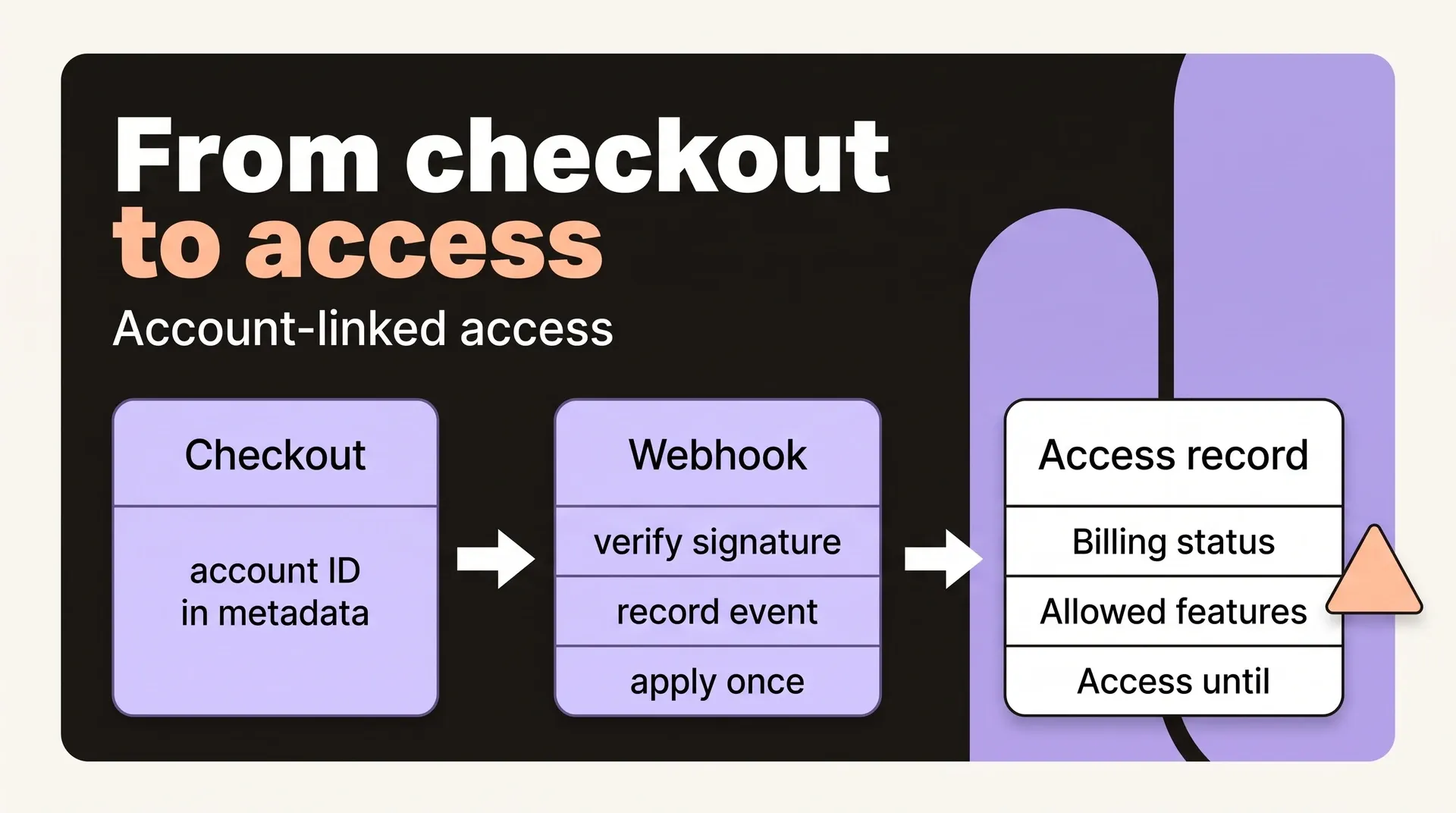
Send the account ID into checkout, verify the webhook, then update your access record:
- Carry the authenticated account or organization ID in checkout metadata.
- Verify the signature, record the event and apply changes idempotently so duplicate deliveries cannot grant extra credits.
- Store billing status, allowed features and the date access runs until.
Each billing state needs an access rule:
- Paid: Unlock the purchased features.
- Trial: Grant trial access only to eligible accounts.
- Cancellation: Offer immediate or end-of-term cancellation, ask for a reason without blocking it, and keep end-of-term buyers active until their paid period ends.
- Paused: Apply your pause policy.
- Expired: End access.
- Plan change: Decide whether upgrades apply immediately, whether downgrades wait for renewal and how unused time is credited.
Configure proration in the billing system instead of building it yourself, and show the effective date and any prorated charge before the customer confirms the change. A customer portal lets buyers update cards and cancel instead of emailing you.
Seats, usage meters and prepaid credits
Each pricing unit needs an app-side check, or you bill for one thing and give away another:
- Seats: Define which memberships count and when access and charges change.
- Usage meters: Define the unit and when work consumes it.
A postpaid charge can fail after compute is spent. A credit wallet only avoids that if your app checks and reserves or debits credits before work starts, blocking jobs with insufficient balance.
Refill only after successful payment. Your policy should specify blocking or overages at exhaustion, and which failed or refunded jobs qualify for credit restoration.
Who owns failed payments and recovery?
A renewal fails while the customer is still using your product, because the card expired, the issuer declined the charge or the buyer's bank required additional authentication. The billing provider can retry the charge, but your app needs to know how long that customer can keep working and what happens if collection never succeeds. Failed payments typically cause 20–40% of total SaaS churn. The median business recovers about 48% of them, and the strongest recovery processes reach 70–85%.
Split responsibility before the first renewal:
- Billing provider: Schedules retries around issuer behavior, uses card updater networks where available, sends reminders and reports whether collection succeeds.
- Your application: Limits how long customers keep working, what they can still do and what payment status restores full access.
- You: Handle the cases that retries and reminders never collect, and record a new deadline whenever you grant an extension.
Your failed-renewal rule needs a deadline and feature limits. An illustrative policy could read: “After a failed renewal, allow seven days of read-only access. On day eight, block access unless payment has succeeded. Restore full access when payment succeeds.”
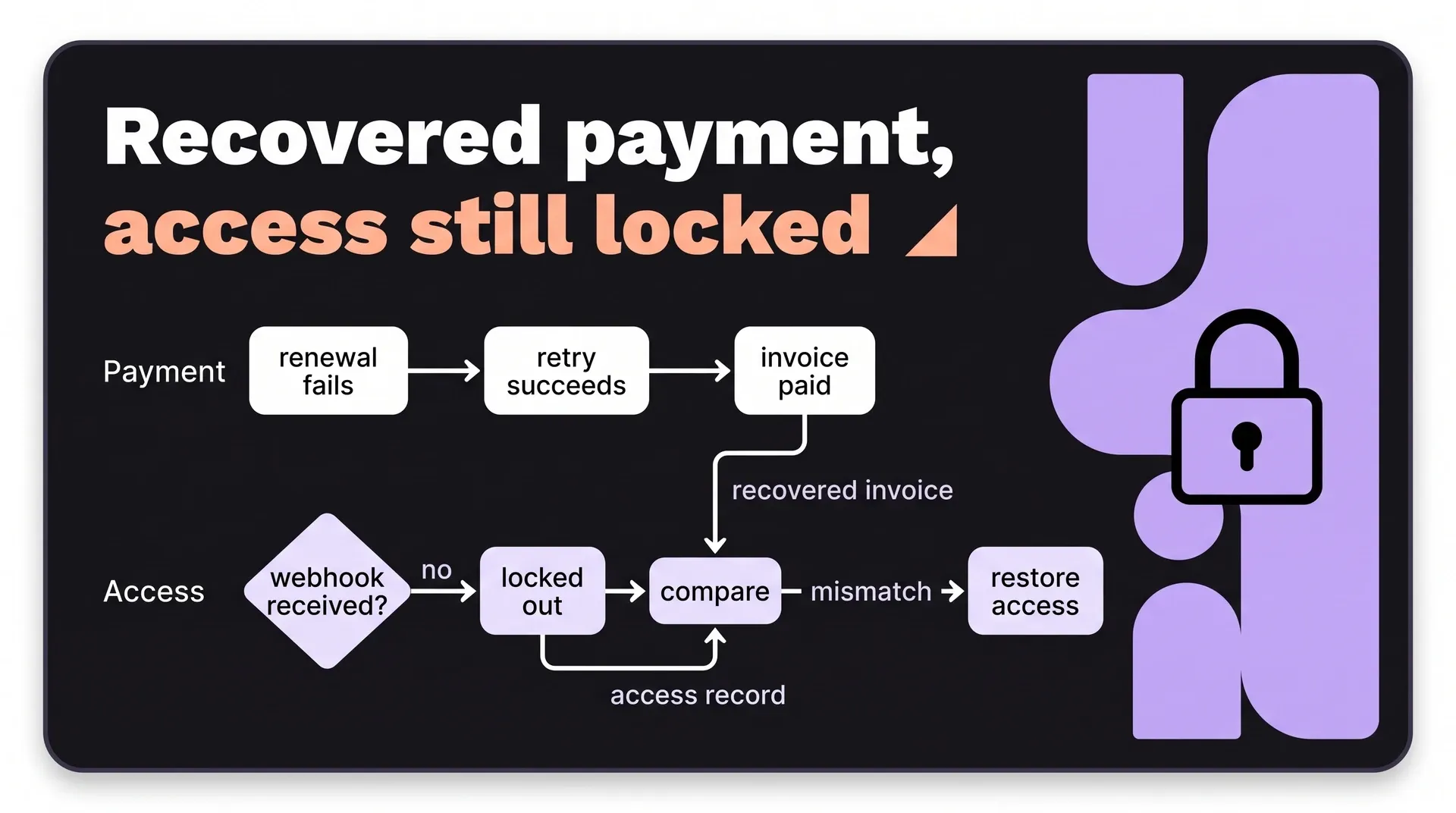
A retry can collect the money while the webhook never lands, leaving a paying customer locked out. Retrying payment will not fix that missing update. Check each recovered invoice against the customer’s access record and resolve any mismatch.
Track failed-invoice count and failed-invoice value separately. The count shows how many invoices need attention. The value shows how much revenue remains uncollected, so a falling count does not hide a large unresolved bill.
Count involuntary churn apart from customers who actively cancel, and log for each failed payment:
- The original failure reason
- Retry attempts
- The channel used to reach the customer
- Card updates
- Amount recovered
- Time to recovery
A checkout abandoned before payment needs a different follow-up: recovery emails can only run if the buyer’s email address is available.
How do you handle global tax from day one?
Customer location and business status affect tax treatment. A consumer paying from Germany and a company entering its VAT number could buy the same plan. The seller must validate that number before using it to treat the company’s purchase differently.
Those obligations can start early. In the EU, a seller based outside the EU owes VAT on B2C digital sales from the first sale, usually reported through OSS, the One Stop Shop scheme. The €10,000 threshold applies only to sellers established in the EU. A non-UK SaaS provider selling digital services to UK customers must register for UK VAT immediately, with no threshold.
Before opening checkout to a market, assign an owner to each tax task:
- Buyer location: Who captures and uses it to determine the applicable tax?
- Tax IDs: Who validates the VAT number before applying business-buyer tax treatment?
- Checkout and invoices: Who calculates the tax and issues an invoice with tax IDs, reverse-charge treatment where it applies, registration details and accurate refund records?
- Registration, returns and remittance: Who registers where required, files the returns and pays the collected tax?
Whichever owner you name for each task, your own business income tax stays yours. For a full walkthrough of the obligations, see this sales tax compliance guide.
How do you find and close your first paying customers?
Repeat visits suggest usefulness. Early selling tests whether buyers will pay, which free signups cannot prove.
Define the buyer and the problem you solve
Look in relevant forums for people describing the same broken task. An illustrative problem description: “They reconcile monthly reports in spreadsheets, delaying decisions, and any replacement must work with their existing tools.”
Problem fit does not mean readiness to buy. Check that they can provide their data, that someone will handle setup and that the person approving the purchase is involved.
Run discovery and a focused demo or trial
Ask: “Walk me through the last time this happened and how you handled it.” The answer gives you a workflow to demonstrate and a consequence to address.
For self-serve buyers, offer a short walkthrough or trial using their own data. Requiring a card on a short trial filters for buyers who intend to pay, though it can lose buyers who need time to evaluate integrations or security. An inactive trial may mean they got stuck importing, so check before assuming lack of interest.
Higher-priced or team deals justify an assisted evaluation. Agree on what would prove value, who handles setup and when they will decide: buy, decline or extend for a named reason.
Answer objections and hand off to onboarding
For a price objection, point back to the time or cost the buyer described. For setup concerns, explain the remaining work. Before payment, clarify whose name appears on the charge, where invoices come from and how to cancel.
Keep the outcome, promises and unresolved concerns in the same document used during the sale. A solo founder needs no separate customer-success tool.
Make the confirmation email actionable: “First, import last month’s data. Reply here if you get stuck.”
Your first week and first 30 days
The first week should leave you able to take payment and give the buyer access. The rest of the month should show where buyers get stuck, whether they pay and why they leave.
Week one: ready to take a paid customer
- Write down the buyer, the price and who will be the legal seller.
- Complete a test-mode purchase that ends with the buyer inside the product.
- Test duplicate and out-of-order webhook events, an expired card, a refund, a failed renewal and an upgrade during an active billing period.
- Check that live checkout and the production webhook work before charging the first real card.
- Set up analytics that follow each buyer from signup to activation, payment, renewal, upgrade and cancellation.
- Give trial users and paying customers one support inbox that you answer yourself.
- Create a launch discount code only if launch pricing is part of your price test.
- Publish refund terms covering eligibility, timing, what cancellation changes and how refunds appear on customer statements.
- Reach a small group of buyers with the same problem, show them a walkthrough or trial, and agree on a test with an end date.
Weeks two and three: help buyers decide
An evaluation needs an agreed outcome and a decision date. Otherwise, a buyer can stay interested without ever buying.
- Help evaluators complete the agreed test and resolve setup blockers.
- Ask for a purchase decision, recording the reason for a decline or extension.
- Start onboarding with the result the buyer agreed to test, so their first session works toward it.
Day 30: choose what to fix next
- Separate setup blockers, product gaps, price objections, failed payments and cancellations. Choose one next-month priority for each group.
- Double down on the buyer group whose qualified buyers activate, pay and describe the same value without heavy explanation.
- Record who chases failed renewals and who pays affiliate or co-founder shares.
Sell your SaaS worldwide with Creem as the legal seller
Creem is the merchant of record we built for SaaS and AI companies, from first sale to fast growth, that sell software to buyers in many countries. It sells to the buyer on your behalf, collects and remits VAT, GST and sales tax for buyers in 190+ countries, issues the invoice and pays out your earnings. You still build, support and deliver the product, including the integration that ties billing to access.
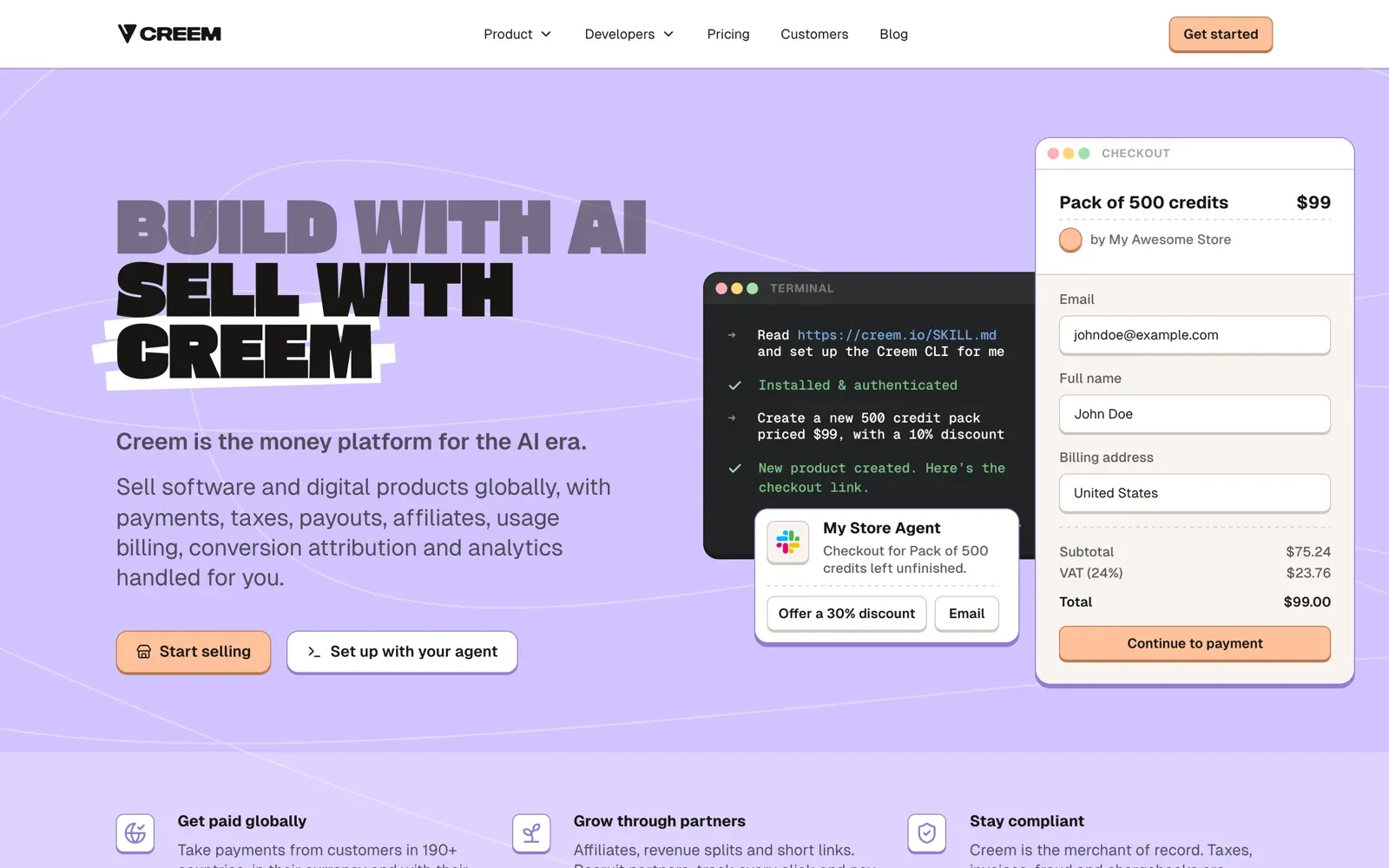
The standard rate of 3.9% + $0.40 per successful transaction includes tax, invoicing, compliance and dispute handling, with no monthly or setup fee. Affiliates and revenue splits run in the same money path, so a partner or co-founder is paid their share of each sale without a separate payout tool. Subscriptions, usage-based billing and prepaid credits sit beside that seller role, so a hybrid plan or credit wallet bills without another tool. In our case study with Uneed, 1,500+ lines of payment code changed with 3 AI prompts and 0 integration errors, in minutes. Our DaisyUI case study shows a migration measured in hours and 0 extra tools for profit sharing. With tax and billing handled in one place, what remains is the product and the buyers you are lining up for your first 30 days.
Start selling to set up your store, verify your identity and send your first buyer to checkout. Only pay when you earn.