
You probably didn't start with a grand plan to run a digital product store. You made a template, a software tool, or a download people kept asking for, then a few sales turned into a steady stream, and suddenly the messy parts showed up. Checkout worked, until someone in another country hit a payment wall. Delivery worked, until license keys, receipts, and support questions started arriving in the same inbox.
That's the point where a store stops being a page and starts being an operation. The product might still be simple, but the system around it has to handle payment, tax, access, refunds, renewals, and payouts without creating a spreadsheet habit you can't escape. For digital products, that operational backbone is the business surface.
The market signal is already there. Internet users spent **over **560 billion on digital media in 2024, a figure reported as up 12.5% year over year, and digital products created **more than **2.5 trillion in value per year as of 2025 source. On top of that, 68% of internet users aged 16+ paid for some kind of digital content each month in 2025 source. The demand isn't the mystery anymore, the hard part is building a store that can keep up with it.
Table of Contents
- The Moment a Digital Product Store Outgrows Its First Setup
- What a Digital Product Store Actually Is
- The Core Capabilities Every Store Has to Get Right
- Business Models and How They Stress the Store Differently
- A Pre-Launch Checklist for New Digital Product Stores
- Why Post-Purchase Operations Are the Real Bottleneck
- Choosing a Platform and Your First 30 Days
The Moment a Digital Product Store Outgrows Its First Setup
The first version usually feels elegant. A creator posts a link in bio, sends buyers to a checkout page, stores files in Google Drive, and copies license details into a Notion table. For ten buyers, that setup feels fast and scrappy. For a hundred, it starts to crack in all the places that don't show up in a launch screenshot.
A solo founder notices it first in small annoyances. Someone in Germany can't finish checkout. A customer asks for a VAT receipt. A partner wants to know where their commission went. By the time those messages stack up, the store isn't just selling a file anymore, it's handling obligations.
Practical rule: if you can't explain where payment, delivery, tax, and support live in one sentence each, the store is still too fragile.
A lot of first-time founders treat those problems as edge cases. They aren't. The moment money crosses borders, the store becomes part product, part finance system, and part compliance workflow. That's especially true in a market where online buying is already normal, and where smartphones accounted for nearly 80% of all retail website visits worldwide in 2024 source. Buyers expect the checkout to work on the device in their hand, not just on a desktop test run.
That's why the old setup starts to fail. A folder is not a fulfillment system. A payment link is not a store. A digital product store is the set of processes that make buying, access, and post-purchase handling feel invisible to the customer, while staying auditable for the founder.
What a Digital Product Store Actually Is
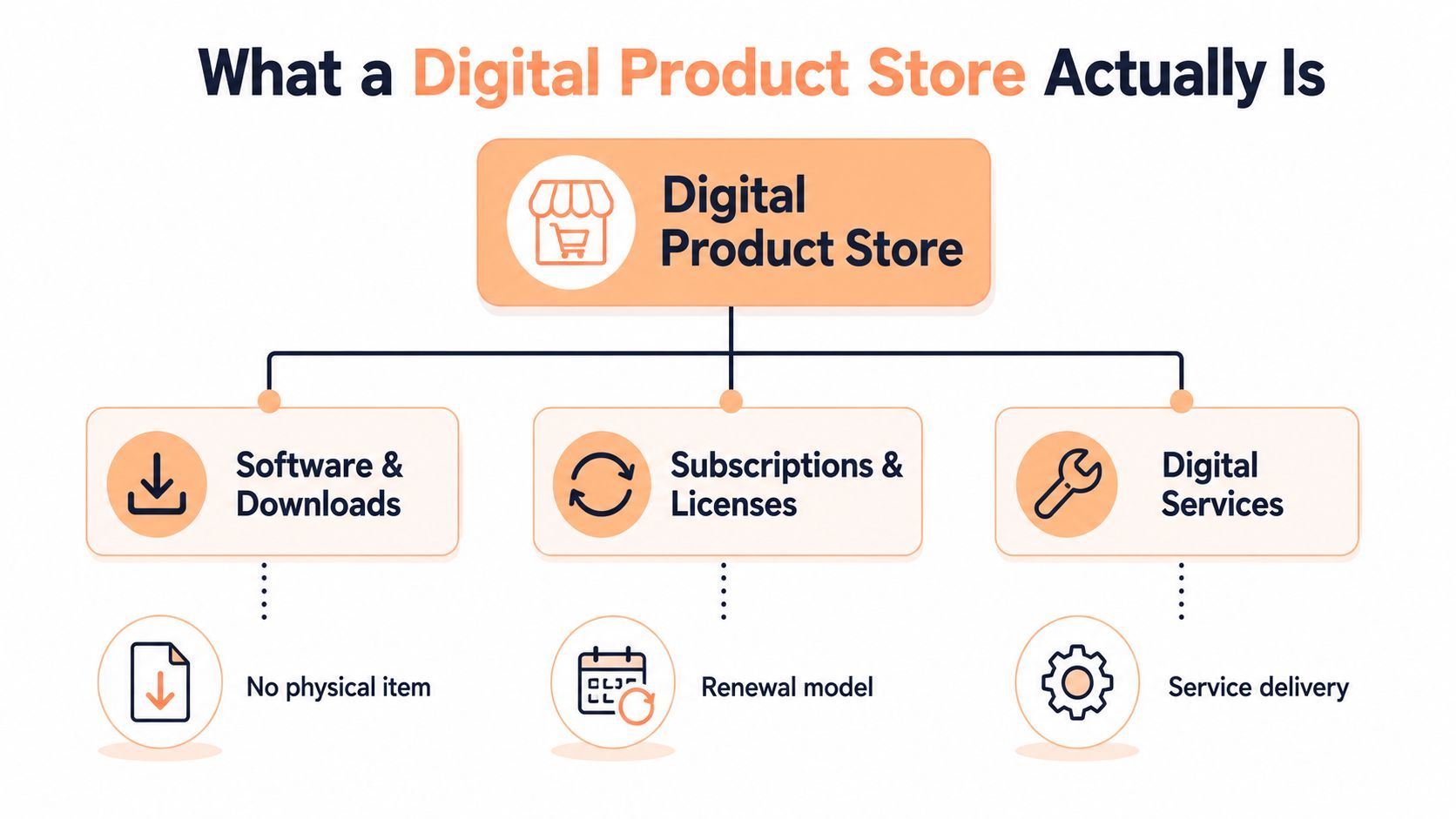
A digital product store sells intangible goods, things like software, downloads, subscriptions, licenses, and digital services, without shipping boxes or managing physical inventory. That sounds simple until you look at the moving parts underneath. A real store isn't a page with a button, it's a layered system that has to keep catalog, payment, access, and records aligned.
The easiest way to understand it is to think in layers. The presentation layer is what the buyer sees, product pages, pricing, and checkout. The application layer handles catalog rules, pricing, payment logic, and order handling. The data layer stores customer, product, and transaction records. When a store grows, integration and infrastructure layers usually appear too, because you need payment processors, tax services, cloud capacity, and APIs to keep the whole thing connected source.
A vending machine with a back office
A useful analogy is a vending machine with a back office. The front panel looks simple. The hidden part has to know what's in stock, what got paid for, what should be delivered, and what gets recorded. A digital product store works the same way, except the delivery happens through links, keys, seats, or subscriptions instead of a snack chute.
That's also why architecture matters. Guidance on digital architecture stresses decoupling, omnichannel access, and analytics so tightly linked storefront, payment, and fulfillment components don't become hard to scale or hard to change source. If you bolt everything together too tightly, adding a new payment method or subscription rule can break the rest of the system.
A single sales page can collect money. A store has to collect money, preserve records, and deliver access without manual rescue work.
The practical takeaway is straightforward. If the product is software, the store needs license handling. If it's a course or file, the store needs secure delivery. If it's recurring, the store needs renewal logic. The store is the operating system around the product, not just the product listing itself.
The Core Capabilities Every Store Has to Get Right
A store that looks polished can still be unreliable underneath. The capabilities that matter most are the ones buyers only notice when they fail. A customer can't complete payment, gets the wrong tax treatment, or loses access after checkout, and the whole experience suddenly feels unprofessional.
Checkout, tax, and delivery
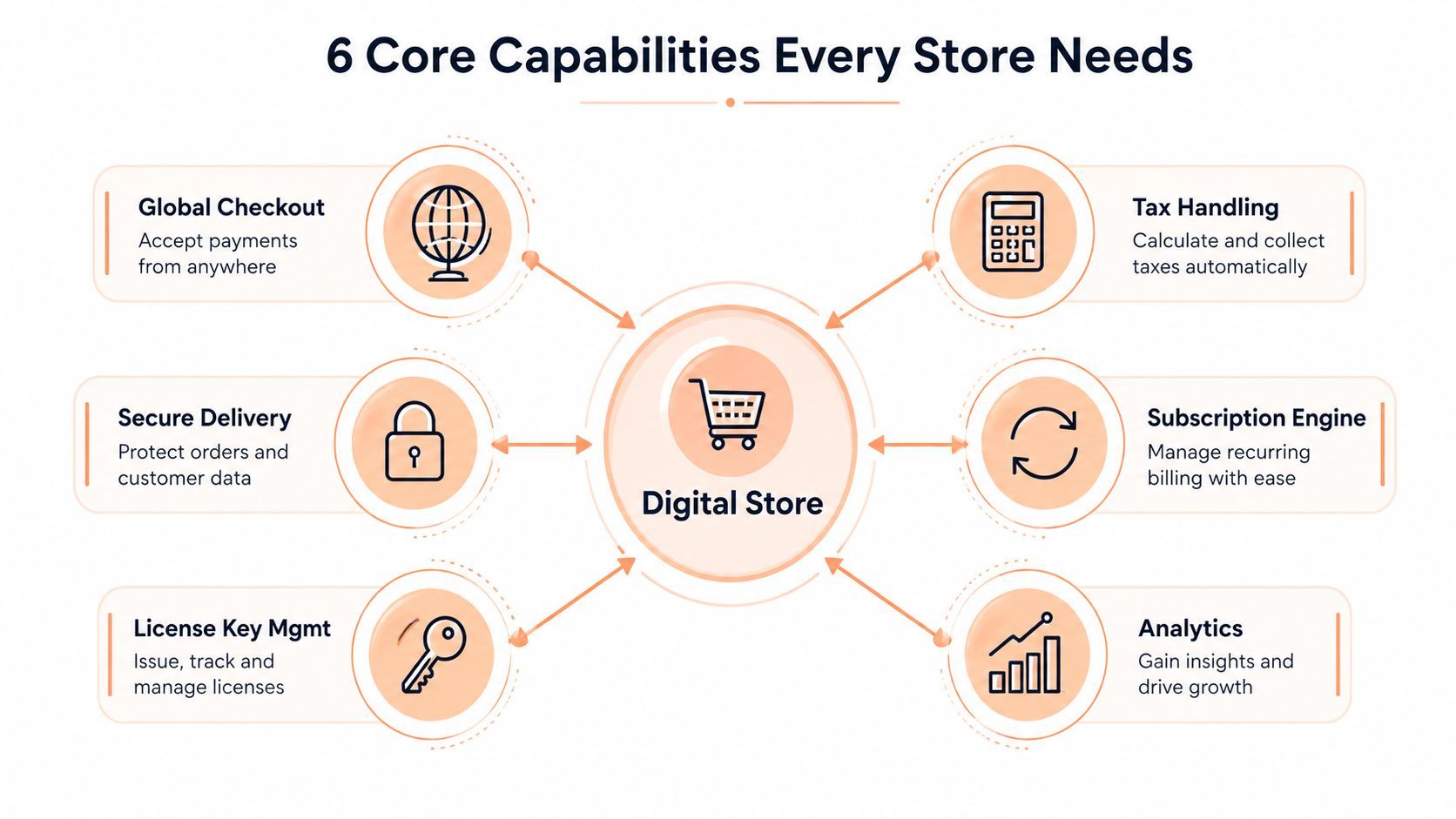
The first layer is global checkout. Buyers need a hosted flow that handles cards and local methods cleanly, because friction at payment time is the fastest way to lose a sale. In a mobile-first buying environment, that checkout has to feel quick, not like a form that belongs to a back office.
The second layer is tax handling. Once sales cross borders, VAT, GST, and sales tax stop being optional footnotes and start shaping the checkout itself. Without automated handling, the founder ends up improvising receipts, trying to figure out what applies where, and building compliance debt into the business.
The third layer is secure delivery. That can mean license keys for software, signed download links for files, or private post-purchase notes for access details. If delivery is easy to copy or easy to leak, the store spends more time solving access disputes than selling.
Renewals, keys, and recovery
Subscriptions add a different burden. A subscription engine needs plan changes, seat-based billing, proration, and self-service updates, because customers don't want to email support every time their team grows or their plan changes. If the billing system can't handle that cleanly, churn rises for reasons that had nothing to do with product quality.
Then there's dunning, the recovery logic that tries to save failed renewals before they become lost revenue. Many founders discover that billing isn't just charging once, it's maintaining payment continuity over time.
Finally, software stores need license key management and usable analytics. Keys should be issued, validated, and revoked cleanly. Analytics should show what's selling, where delivery is failing, and where customers are dropping off, because you can't fix what you can't see.
If a capability creates support tickets every week, it isn't a side issue. It's part of the product.
A modern digital product store earns trust by making these layers feel boring. That boringness is the feature.
Business Models and How They Stress the Store Differently
Not every digital product store is stressed in the same way. A one-time download, a subscription, and a partner-driven storefront all look similar on the front end, but they fail in different places behind the scenes. The model you choose decides what the store has to do well every day.
| Business Model | Primary Operational Demand | Capabilities That Matter Most | What Breaks First |
|---|---|---|---|
| One-time download | Safe one-and-done fulfillment | Secure delivery, receipt handling, refund workflow | Access problems and support volume |
| Recurring subscription | Continuous billing continuity | Dunning, plan changes, seat management, self-service | Failed renewals and manual support |
| Revenue-share or affiliate-led sales | Coordinating multiple parties | Splits, payout timing, affiliate tracking, commission logic | Spreadsheet reconciliation and payout disputes |
A one-time download is the simplest model, but it still needs discipline. Buyers expect the file, the key, or the access note to arrive immediately, and they expect receipts to make sense if they ever need them later. If delivery is clumsy, the store looks small even when the product is good.
Subscriptions are more demanding because time is part of the product. A customer might add seats, downgrade, pause, or lose a payment method and never come back if the recovery flow is weak. The store has to treat renewal as an ongoing service, not a one-time transaction.
Revenue-share models add people, which adds complexity fast. Co-founders, agencies, contractors, and affiliates all want a clear answer to the same question, who gets paid, when, and how much. The more parties involved, the less room there is for manual math.
Founders often over-focus on the storefront and under-focus on the operating model. A beautiful page can't fix a business model that creates payout confusion every month. The store has to match the revenue shape of the business, not just the visual brand.
A Pre-Launch Checklist for New Digital Product Stores
Before you open the doors, make a few decisions that will save you from rework later. These aren't chores, they're design choices that shape how the store behaves once real customers start buying.
Catalogue and pricing choices
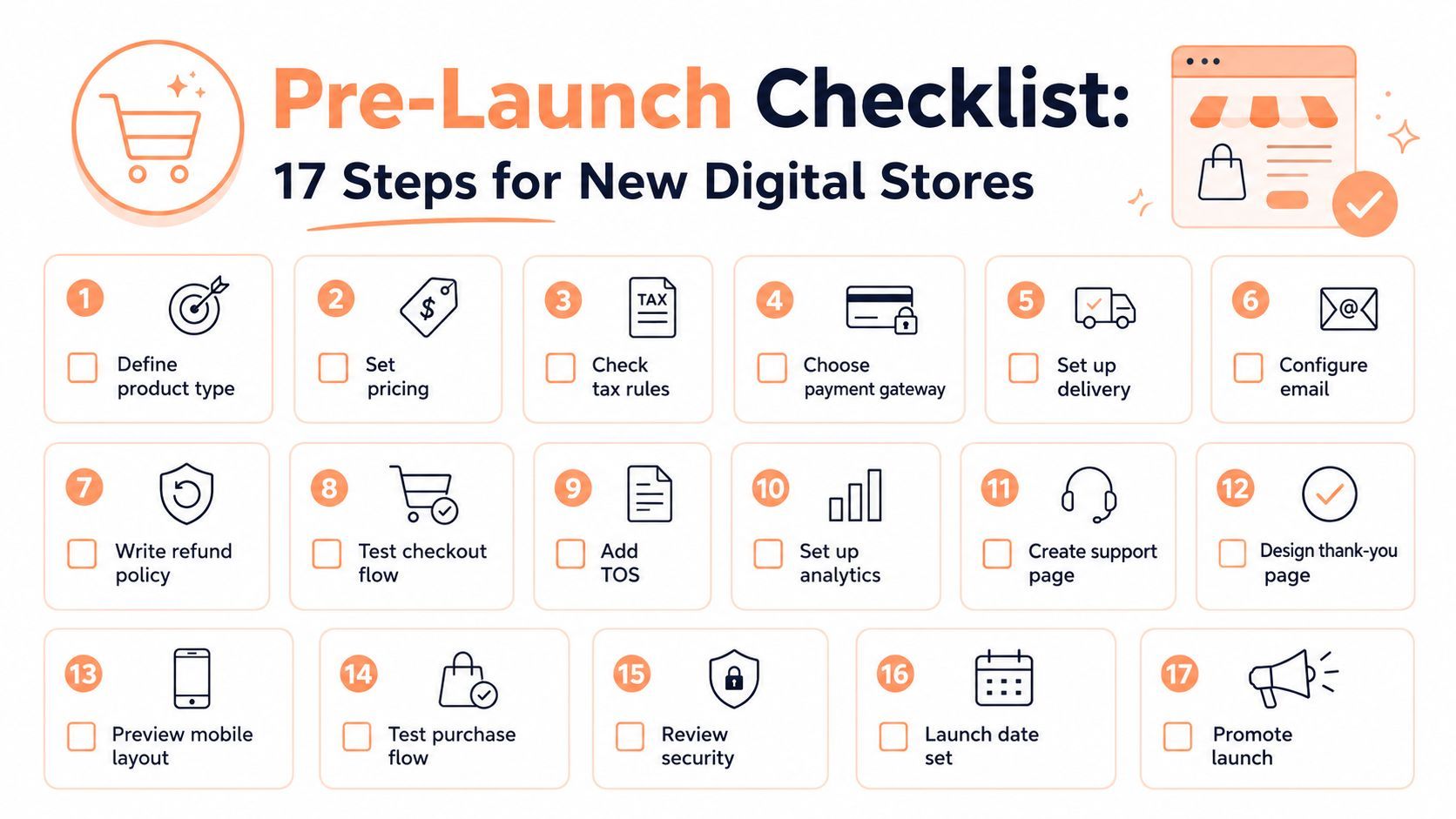
Start with product type. Decide whether you're selling a download, a license, a subscription, or a service, because that choice determines the rest of the stack. Then set pricing in a way that fits the product's delivery cost and support load.
Next, decide how the offer is packaged. A solo file and a bundle behave differently once refunds, upgrades, or renewals enter the picture. If you sell software, choose how license keys are generated and validated before launch. If you sell subscriptions, decide whether they're seat-based or tier-based, because that affects invoicing and customer expectations.
For launch ideas and product formats, this guide pairs well with digital product ideas for creators, especially if you're still choosing between templates, software, or membership-style offers.
Payments, compliance, and delivery
Choose the payment gateway and the checkout method together, not separately. A checkout that looks polished but can't handle the regions your buyers live in will create friction on day one. After that, decide whether you're using a merchant of record model or handling tax directly, because that choice affects receipts, filings, and accounting.
Delivery needs a decision too. Will buyers get a signed download link, a private note, a dashboard login, or a license key by email? Each option has support implications. Then write the refund policy in plain language, configure email notifications, and preview the thank-you page on mobile.
Useful habit: test the full purchase flow with a fresh email address before you launch publicly, not after the first complaint.
The last cluster is post-purchase plumbing. Set up analytics, create a support page, review security settings, and confirm the launch date only after the whole path works end to end. The checklist is simple, but every item protects a part of the business that buyers assume already works.
Why Post-Purchase Operations Are the Real Bottleneck
Most founders think the hard part is getting the first sale. That's understandable, because the first sale is visible and exciting. The quieter truth is that a digital product store starts getting difficult after the sale, when receipts, tax, renewals, and partner payouts pile up.
Automated invoicing is a good example. If every transaction needs a manual receipt or invoice, your store grows a hidden admin team of one. For a practical breakdown of how that gets handled in software and digital selling businesses, the automated invoicing guide for SaaS and digital sellers is a useful reference point.
Tax is even less forgiving. A creator selling across borders can't treat compliance as an afterthought once international orders start landing. A clear example of that complexity shows up in the Chern & Co VAT-OSS case study, which is worth reading if you want to see how quickly digital services can run into filing and registration questions.
Dunning, splits, and payout timing
Failed payments are another hidden drag. If the store doesn't recover renewals well, revenue leaks out, one expired card at a time. The buyer doesn't always churn because they changed their mind, sometimes they just hit a payment failure the system didn't rescue.
Revenue splits are equally important. Once co-founders, contractors, or affiliates are part of the business, someone has to determine who gets what without hand-built reconciliation. That's manageable for a tiny store, then turns brittle as transaction count rises.
Payout timing closes the loop. When money reaches bank accounts on a predictable cadence, operations stay calm. When payouts are ad hoc, founders spend more time checking balances than improving the product.
The important insight is that post-purchase operations don't feel like growth until they break. Buyers only see a smooth purchase, but founders feel every failure in support tickets, accounting work, and delayed cash flow.
Choosing a Platform and Your First 30 Days
The platform choice should be boring in the best way. It should handle global checkout, tax, secure delivery, subscription management, revenue splits, and payment recovery without forcing you to build each piece separately. If it also gives you hosted checkout, license handling, receipts, and affiliate logic in one place, you've removed a lot of future maintenance.
If you're evaluating tools, also compare the surrounding ecosystem. A resource like best seo agency for SaaS can be helpful later if you need acquisition support, but the platform choice comes first because marketing won't fix broken operations. The store has to work before traffic scales.
A practical 30-day sequence
Week 1, define the offer. Decide the product type, pricing, access model, and whether support will be tied to the purchase or the account.
Week 2, connect commerce plumbing. Set up checkout, tax handling, receipts, and delivery so the first real payment doesn't expose gaps.
Week 3, test failure paths. Try a failed card, a refund, a changed plan, and a delivery edge case. If you're using a merchant-of-record approach, confirm what the platform handles and what still needs your attention. A resource like the international payment processing guide for global SaaS can help you think through the payment side before launch.
Week 4, open to the public. Launch to a small audience, watch support messages closely, and keep an eye on delivery, renewals, and payout timing. Don't optimize for polish only, optimize for the number of things you don't have to do manually.
Creem is one option in this category. It combines hosted checkout, automated tax handling, subscriptions, revenue splits, affiliate tools, license keys, receipts, and file delivery in one platform, so the store's operational pieces live together instead of across separate systems.
If you're building a digital product store and want the checkout, tax, billing, and payout layers handled in one place, take a look at Creem. It's built for software teams and digital product makers who need the post-purchase plumbing to work as reliably as the product itself.