

Table of Contents
- Introduction to Developer Experience
- Understanding Developer Experience Principles
- Measuring Developer Experience Signals
- Tooling and Documentation Best Practices
- Improving Developer Experience with Payments Platforms
- Real-World Examples of Developer Experience Improvements
- Conclusion and Next Steps for Developer Experience
You're in the middle of a launch, and the same pattern keeps repeating. A payment API returns an odd error, the docs don't match the SDK example, the webhook payload looks different in staging than it did yesterday, and your deploy is waiting on one more manual fix. That's the kind of day when developer experience stops feeling abstract and starts looking like blocked revenue, slower shipping, and a team that's too busy untangling systems to build the product.
Introduction to Developer Experience
A developer's day can look productive on the surface, while hidden friction keeps slowing the work underneath. A build takes longer than expected, an API behaves differently than the docs suggest, and a payment integration needs another round of trial and error before it works. Those are developer experience problems, because they shape how easily a team can build, test, and ship.
Gartner treats developer experience as a measurable business function, not a vague comfort metric. It describes DevEx as the overall satisfaction and productivity of developers using tools, frameworks, and platforms, with assessment across 21 attributes and five key outcomes to compare performance against the market (Gartner developer experience overview).
That matters because the cost of friction shows up in release speed and in the quality of the systems behind revenue. A payments platform can make this easy to see. If its APIs are clear, its webhooks are predictable, and its documentation answers integration questions before they slow the team down, developers move faster and spend less time fixing preventable issues. If the checkout flow or payout setup is confusing, even a strong product team loses time on support tickets, retries, and internal workarounds.
The business pressure is already visible. Gartner says 94% of organizations already have a DevEx strategy, but only one in four describe it as mature and value-delivering, while 75% of respondents say their ability to compete depends directly on how fast they ship quality software, and 58% of software engineering leaders call DevEx a highly critical leadership priority (Gartner developer experience overview). The pattern is clear. Many organizations know developer experience matters, but far fewer have removed the friction that keeps delivery slow and inconsistent.
For developers, that friction rarely arrives as one major failure. It usually appears as small interruptions that keep breaking momentum, a broken pipeline, a confusing integration step, or a document page that almost answers the question. Each interruption adds a little more delay, and together they make simple work feel heavy.
Understanding Developer Experience Principles
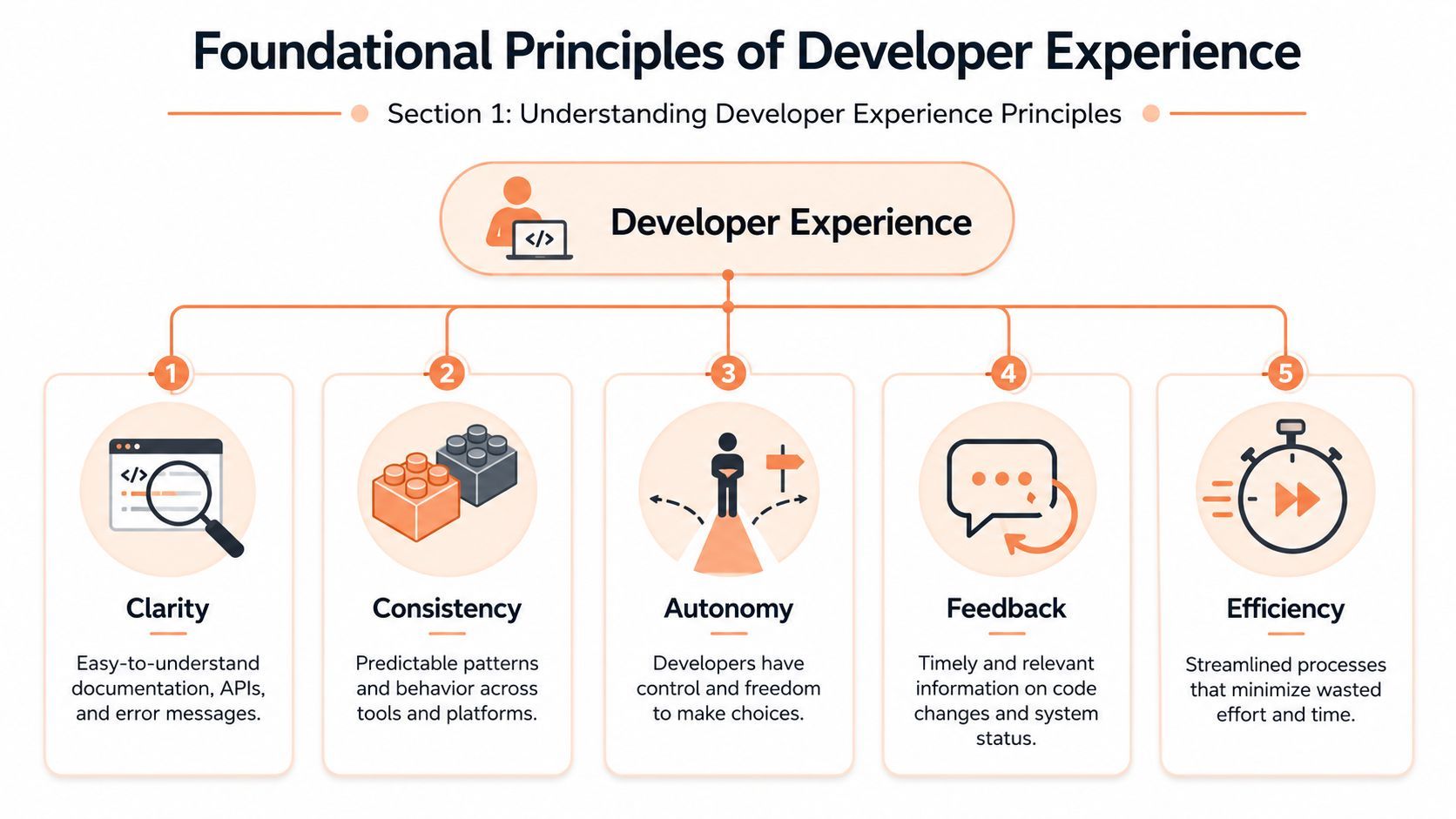
A developer can have all the right tools and still lose time if the work is unclear, inconsistent, or full of avoidable handoffs. That is why developer experience is easier to understand through the conditions around the work, not as a vague overall feeling. The five principles that shape those conditions are clarity, consistency, autonomy, feedback, and efficiency. Each one answers a practical question, can a developer see what is expected, trust the system, choose a sensible path, learn from the result, and keep moving without wasted effort?
Clarity and consistency
Clarity works like road signs on a drive. The next turn is visible, the route is easy to follow, and if something goes wrong, the message points to the issue instead of forcing a guess. In developer workflows, clarity shows up in readable documentation, understandable APIs, and error messages that explain what failed and where to look next.
Consistency is what keeps a toolchain from feeling like a different system every time a developer changes context. When build steps, naming, webhook behavior, and deployment patterns follow the same logic, teams spend less time decoding the platform and more time shipping code. That matters even more in payments work, where integration details shape release speed and revenue flow. Clear checkout setup, predictable payout handling, and stable API patterns reduce the back-and-forth that can slow product work. A useful churn analysis guide can also help teams see how friction in a revenue path shows up later in retention and support work.
Autonomy, feedback, and efficiency
Autonomy matters because developers work better when they can make reasonable choices without waiting on constant approvals. A well-designed platform gives guardrails, not handcuffs. It states what good looks like, then lets people reach it in their own way.
Feedback is the signal that tells a developer whether a change worked, failed, or needs adjustment. Good feedback loops reduce guesswork and keep small mistakes from turning into long debugging sessions. Poor ones leave people coding blind, waiting too long to learn whether the path was correct.
Efficiency is the result of removing wasted steps, repeated effort, and avoidable context switching. It is not an extra benefit at the end of the process. It shows up when a platform lets routine work stay routine, so attention stays on the task instead of on the tooling around it.
Practical rule: if a new developer needs help with the same task more than once, the problem usually sits in the workflow, not the developer. A missing layer of clarity, consistency, or feedback is often what makes the task hard to repeat.
Measuring Developer Experience Signals
Measuring developer experience works best when you use both workflow telemetry and developer sentiment. Telemetry shows where the system slows down. Sentiment shows where the friction feels worst. A practical framework tracks feedback loops, cognitive load, and flow state using objective signals paired with survey questions, so you can catch bottlenecks and mental friction together (Octopus DevEx metrics framework).
The three measurement dimensions
Feedback loops tell you how fast developers learn whether a change worked. If builds, reviews, and deployments stall, the loop stretches and momentum drops. Cognitive load is the mental effort required to get through routine work, which rises when docs are vague, tools are inconsistent, or error states are hard to interpret. Flow state measures how often developers can stay focused long enough to do deep work without interruption.
A lot of teams make the mistake of watching only one side of the picture. Surveys without telemetry can feel subjective. Telemetry without sentiment can miss the human cost. The better answer is to combine them.
| Signal | Dimension | Metric Example |
|---|---|---|
| Build speed | Feedback loops | Time from code change to successful build |
| Code review wait | Feedback loops | Time to first reviewer response |
| CI queue time | Feedback loops | Time a job waits before execution |
| Documentation friction | Cognitive load | Survey feedback on API and setup clarity |
| Confidence to change code | Cognitive load | Survey rating on change safety |
| Interruption rate | Flow state | Developer-reported context switching during focus time |
| Manual pipeline steps | Flow state | Count of steps that require handoff or repeated input |
What to watch first
If you're deciding where to start, watch the places where work stalls most visibly. Long review queues, slow CI, and repeated manual handoffs usually show up before broader morale problems do. That's also where an operational lens helps. Teams looking at churn analysis can use the same mindset: a small friction point can be easy to ignore until it starts shaping behavior. This churn analysis guide is useful for thinking about how early warning signals can surface before a bigger drop-off.
The point of measurement isn't to create a scoreboard. It's to spot friction while it's still cheap to fix.
Tooling and Documentation Best Practices
Good tooling and documentation make the developer path feel obvious. Bad ones make every task feel like a scavenger hunt. Atlassian's 2024 research found that 69% of developers lose eight hours or more per week to inefficiencies, which it equates to 20% of working time, and its 2025 report says the problem persists even with AI adoption, because 99% of developers report time savings from AI tools, yet 50% still lose 10+ hours weekly to non-coding tasks and 90% lose 6+ hours or more to that same kind of overhead (Atlassian 2024 DevEx report).
Tooling that keeps work moving
A useful toolkit is like a well-marked workshop. Developers should be able to pick up the right tool, use it, and move on without guessing which drawer holds the next part.
- Typed SDKs: Give developers predictable objects, clear method names, and fewer integration surprises.
- Reliable webhooks: Keep event handling stable, documented, and easy to test.
- Versioned APIs: Make changes explicit so teams know which behavior is current.
- Readable error states: Show what failed, where it failed, and what to check next.
- Searchable docs: Help people find answers from the error message, not only from tribal knowledge. A hosted resource helps when it shortens setup time and removes guesswork. For teams experimenting with AI-assisted workflows, the on-demand AI compute quickstart shows how a clear starting point can reduce early integration friction.
Documentation that gets used
Documentation works when it behaves like a good coworker. It answers the obvious question first, then gives enough detail for the person who wants to go deeper. That means a short getting-started path, clear examples, and a predictable place to look for edge cases.
A simple structure helps here. Start with the first successful path, then add the failure cases developers are most likely to hit. If a payment integration returns an error, the docs should explain whether the problem is an invalid key, a webhook mismatch, or a missing configuration step. That same pattern helps in other systems too, including AI or compute integrations that need clear setup steps, and it is why a concise reference can matter as much as the API itself.
Internal webhook guidance matters too, especially when developers need event-driven systems to stay in sync. A focused reference like this webhook implementation guide can help teams think about structure, payload handling, and operational reliability in one place. For revenue tools, that matters because a missed event can affect billing, access, and support work all at once.
Checklist: if your docs answer the happy path but not the first failure, your developers will still feel blocked.
Improving Developer Experience with Payments Platforms
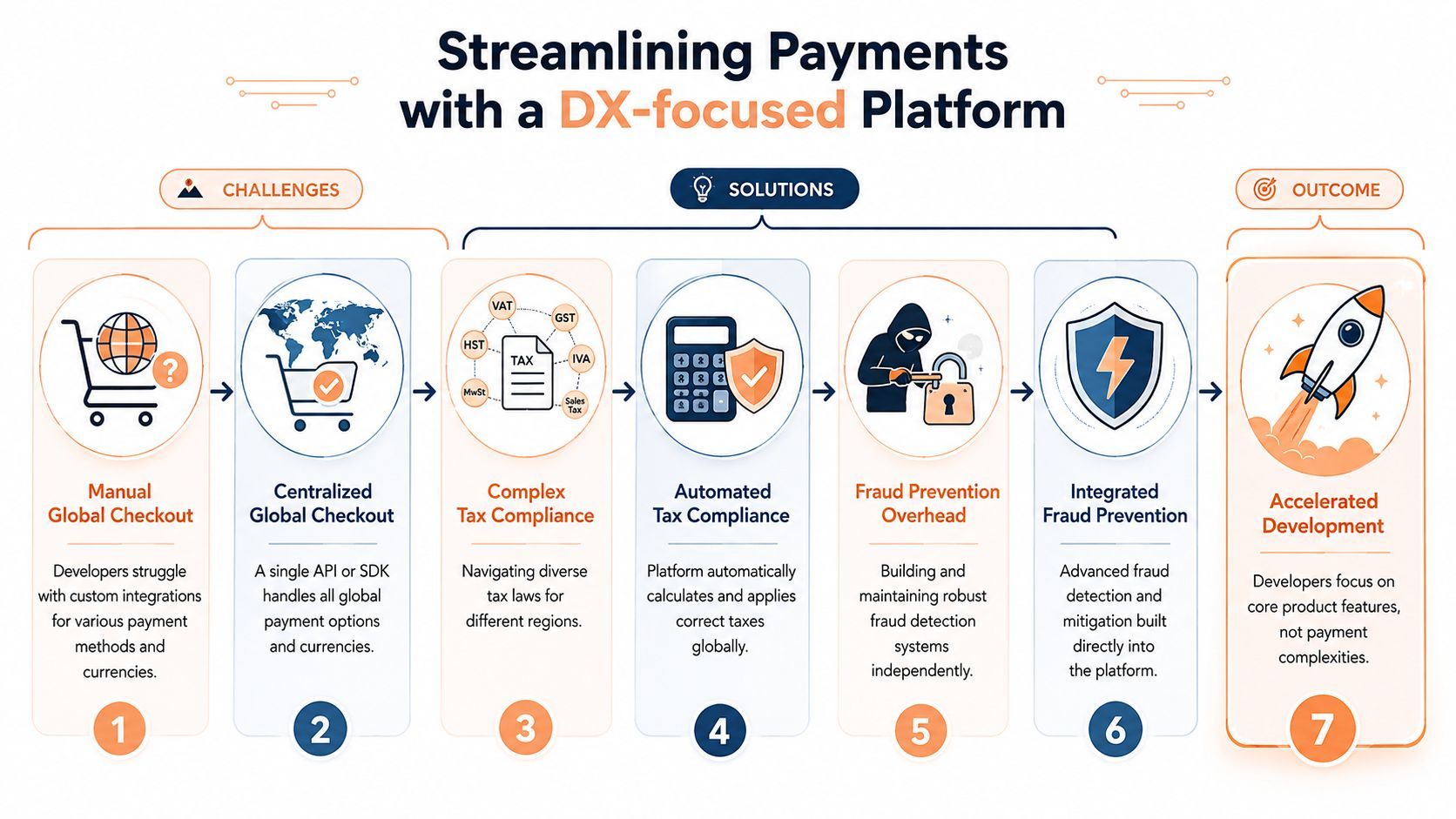
Payments work is one of the fastest ways to expose weak developer experience. Every new checkout flow, tax rule, subscription edge case, and webhook retry adds another place where integration can break. In production environments, slow CI queue times and manual payment workflows amplify cycle time, lowering iteration speed and frustrating developers (Datadog DevEx in the AI era).
Why payments create hidden DX debt
Payments usually force developers to switch between product logic, compliance rules, event handling, and support troubleshooting. That creates more context switches than anticipated. A payments platform that centralizes global checkout, tax compliance, subscription billing, and webhooks reduces those switches by letting the team work against one integration surface instead of several disconnected systems.
That's where a platform like Creem fits naturally. It offers merchant-of-record coverage, hosted checkout, subscriptions, webhooks, revenue splits, and developer-facing APIs in one place, so teams can connect revenue infrastructure without stitching together separate tools. Creem's billing flow also gives teams a cleaner path for SaaS subscriptions and recurring payments, which is why its billing guidance can matter to product teams building revenue features at the same time as core product work (Creem billing for SaaS).
What a simpler integration path looks like
A practical integration path usually starts with SDK installation, then moves to checkout configuration, webhook handling, and finally revenue operations like subscription changes or payouts. When each step is exposed through consistent docs and a single API, developers spend less time reconciling systems and more time building product features.
The DX benefit is straightforward. Fewer moving parts means fewer edge cases to debug, fewer support escalations, and less time lost to compliance questions that don't need to live in the product codebase. Revenue tools shouldn't make the product team feel like they've inherited a second platform. They should disappear into the workflow.
Real-World Examples of Developer Experience Improvements
A solo builder shipping a paid tool like a lightweight invoicing app or a niche analytics dashboard usually starts with a stack of practical questions. How do payments work? Which webhook events matter? What happens when an update fails halfway through a subscription flow? In one common scenario, the builder replaces a brittle custom checkout with a hosted SDK, then spends less time wiring up edge cases and more time improving the product itself. The payoff is fewer integration surprises and a steadier path from prototype to revenue.
A SaaS startup runs into the same problem from a different angle. New engineers need to learn the billing system, support teams need event accuracy, and product changes keep touching revenue logic in small but risky ways. When that team standardizes webhook handling and gives itself clearer docs for subscription states, failed payments, and plan changes, onboarding gets easier and people stop asking the same operational questions over and over. The work becomes easier to read, like a codebase with well-named functions instead of a tangle of scripts, and that is often the first clear sign that developer experience is improving.
The measurement gap still matters. Teams may have survey data, but they often lack cheap leading indicators, so friction stays hidden until adoption slows or support tickets start pointing to the same integration pain. In payments work, that pain can show up in a checkout that requires extra manual steps, webhook retries that are hard to trace, or revenue events that arrive without enough context for the team to act on them. Measure developer experience gaps is a useful reminder that the signs appear first in team behavior, then in cleaner handoffs, and only later in the business outcomes people like to cite.
The strongest DX wins usually look small at the start. A cleaner webhook path, a better error message, a shorter setup flow, those are the changes developers remember.
Conclusion and Next Steps for Developer Experience
Developer experience is no longer a vague culture topic. It's a measurable operating layer that affects how fast teams learn, how much mental effort they burn, and how reliably they ship. The clearest path forward is to treat it like any other important system, with signals, ownership, and deliberate improvement.
Start with a simple checklist. Audit your current feedback loops, identify where cognitive load is highest, and check where developers lose focus most often. Then tighten the basics, clearer docs, cleaner tooling, and fewer manual handoffs. If payments are part of your product, look closely at the integration surface too, because revenue logic can create hidden friction faster than almost any other subsystem.
The teams that improve here usually don't do it with one dramatic change. They remove one obstacle at a time, then keep going until the workflow feels natural.
If your team is spending too much time untangling billing, checkout, and webhook work, Creem gives software builders a single place to handle those revenue flows. Visit Creem to see how a payments platform can reduce integration friction and make developer experience easier to manage in the part of the stack that often slows teams down most.